Problem Statement
Healthcare Triage Crisis
Hematology Triage Nurses Can Spend an Estimated 4–6 Hours Per Shift Managing High-Volume Referrals Across Fragmented Systems
The healthcare system loses over $90 billion annually to administrative inefficiencies. Nurses spend 20–40% of triage time searching across disconnected systems (EHRs, lab platforms, and imaging tools) before they can even begin clinical decision-making. In hematology, where delays can postpone cancer diagnosis by weeks, this data fragmentation creates real clinical risk. The problem isn't nurse expertise. It's systems that don't support fast, high-stakes decisions.
Quantified Reality
20–40%
Time spent searching, not deciding
~45%
Referrals arrive incomplete
12–18 min
Lost per referral to data hunting
50–60%+
Nurse burnout linked to workload
Design Process
1 - Research
The Triage Burden:
Understanding Referral Workload, Time Pressure, and Clinical Risk
"I'm trained to make clinical decisions, but most days I'm just trying to keep up with referrals."
Hematology Triage Nurse
We collaborated closely with 6+ hematology physicians and multiple triage nurses to understand the lived reality of referral triage. Through direct workflow observation, one-on-one interviews, and survey-based analysis, we conducted both qualitative and quantitative research to capture how triage decisions are made under real clinical constraints.
What emerged was not a problem of missing expertise, but one of sustained cognitive pressure. Nurses described spending most of their shift processing referrals continuously balancing speed, accuracy, and patient safety with little margin for pause.
Triage decisions often occur after long hours of screen time, back-to-back cases, and mounting fatigue. In this environment, the fear is not making the wrong decision but missing a critical signal because of exhaustion or time pressure.
These patterns appeared consistently across clinicians and became the foundation for deeper quantitative analysis in the following section.
These patterns appeared consistently across clinicians and became the foundation for deeper quantitative analysis in the following section.
Qualitative Research
Observing triage work in real time and interviews revealed a consistent pattern: clinical reasoning often begins only after prolonged cognitive and navigational effort. Nurses described spending long stretches of each shift reviewing referrals under pressure knowing that every case could represent a serious malignancy, and that missing a signal could have life-altering consequences.
"By the time I'm ready to make a decision, I'm already mentally exhausted."
— Hematology Triage Nurse
"I want to think clinically, but most of my time is spent just getting to a point where I can."
— Hematology Triage Nurse
These insights reinforced that the problem is not clinical skill, but the cognitive cost of triaging complex referrals at scale, across fragmented systems and under constant time pressure.

78%
of nurses described triage as mentally exhausting before clinical judgment begins

72%
reported high anxiety about missing critical information during referral review

67%
said decision confidence drops significantly later in long shifts

83%
expressed the need for clear, visual patient summaries before deciding
Quantitative Research
To validate our qualitative observations, we conducted quantitative research using structured surveys focused on triage time, system usability, and decision confidence. The results closely aligned with our interview findings and highlighted systemic inefficiencies embedded in referral workflows.
Clinicians consistently emphasized the importance of remaining in control of triage decisions, even when supported by intelligent systems. Automation without transparency was viewed as unsafe, while explainable, assistive AI was seen as valuable.
60–70%
of triage time is spent reviewing and assembling referral context not deciding
3–5 systems
accessed on average per referral during triage
82%
reported that contextual & visual patient timelines & EHR would significantly reduce triage effort
100%
agreed that AI must support, not approve clinical decisions
2 - Synthesis
How might we save clinical time by designing a triage system that is fast, trusted, and easy to use?
Across the literature review and stakeholder research, one clear insight emerged: delays in classical hematology referrals are driven less by clinical complexity and more by time lost navigating fragmented systems. Clinicians spend valuable time searching across screens for referral notes, lab trends, and patient history before they can act. What they need is not another triage tool, but a trusted system that reduces this time burden -
bringing information together, supporting faster decisions, and keeping clinicians in control while AI remains transparent and accountable.

Time Is the Bottleneck
Clinicians spend a significant portion of their day navigating records rather than making decisions. In hematology referrals, time lost to searching and switching systems delays care. The design must prioritize speed and efficiency by reducing steps, minimizing navigation, and bringing the right information into one place.

A System, Not Just a Tool
Triage does not happen in isolation. It depends on labs, documents, timelines, and handoffs. Clinicians need a system that supports the entire triage workflow, not a standalone feature. Information should be organized around decisions, not scattered across interfaces.

Accountable AI Support
AI can help summarize and prioritize, but clinicians must always understand and control its output. The system should explain why suggestions are made, show supporting data, and allow easy overrides. AI is used to assist decisions, not make them.
Personas
Through clinical observations and interviews, I identified three primary user types who interact with the triage system daily.
Hematology Triage Nurse
Handles first-pass triage for incoming referrals and determines urgency under time pressure.
"I spend most of my time finding labs and notes before I can even start thinking through the case."
Attending Hematologist
Reviews complex referrals while balancing clinic responsibilities and limited time.
"A lot of my time goes into piecing together charts instead of making the actual decision."
Triage Coordinator
Tracks referral status, lab completion, and follow-ups across patients and providers.
"The information is in the EHR, but I have to jump across tabs and reports to understand what's going on."
This highlighted a core design challenge: How might we reduce triage time by bringing efficiency and required clinical data together in one coherent system?
3 - Ideation
Exploration of Ideas:
How I arrived at the triage system
Using affinity mapping, concept mapping, and ongoing discussions grounded in hematology triage workflows, I explored ways to reduce this time burden while keeping decision-making efficient and clinically sound.
Initial Concepts
• AI-assisted triage support with priority and risk indicators
• AI-powered summaries of referrals highlighting key findings
• Visual representations of EHR data and patient timelines
These early ideas focused on improving speed and clarity during triage by organizing information around how clinicians actually work, rather than introducing isolated tools.
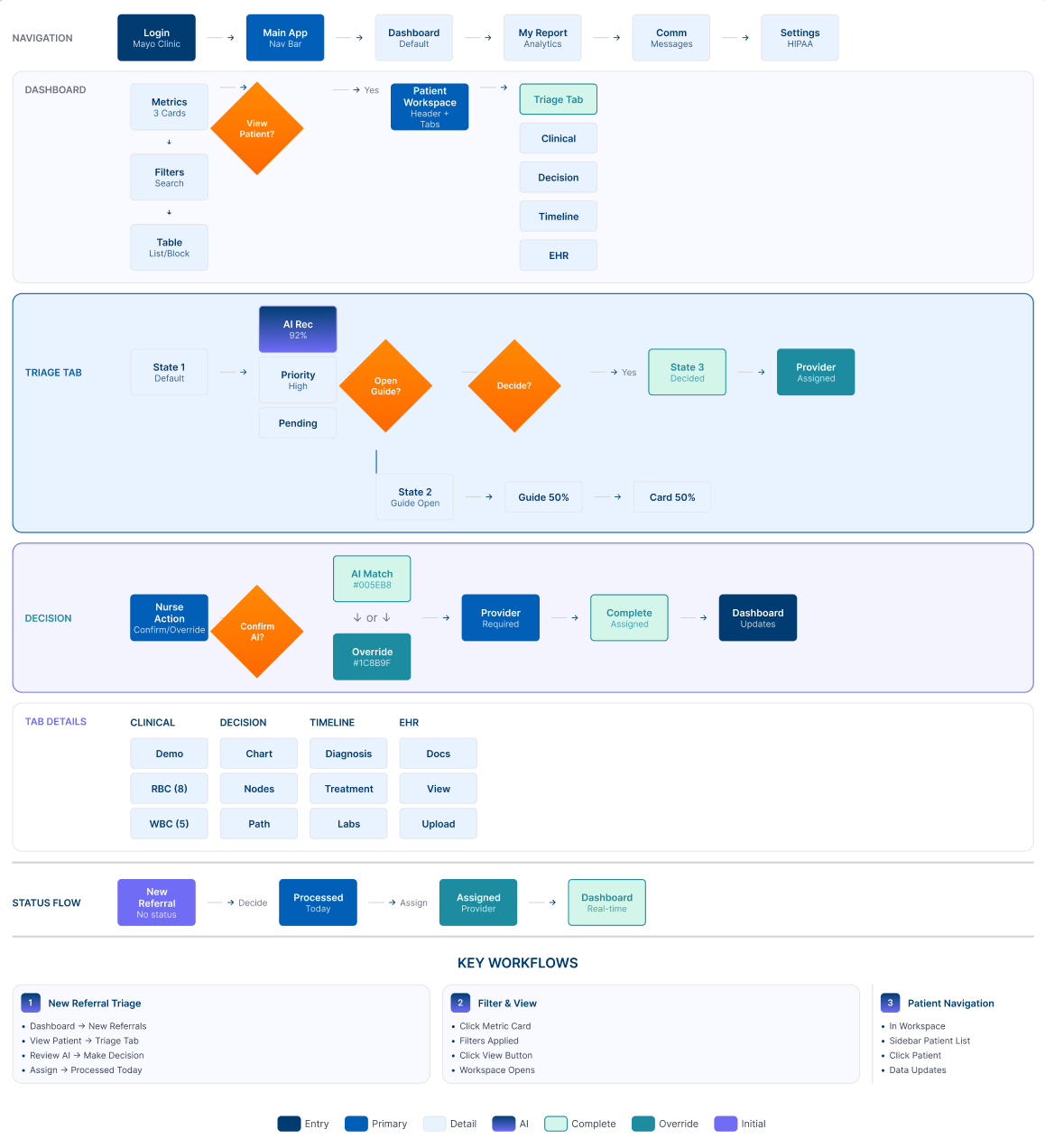
User Flow
Streamlined Triage Workflow:
Designed Around Clinical Reality
The user flow was shaped by observing how triage nurses and clinicians move through referrals under constant time pressure.
Rather than changing how decisions are made, the focus was on reducing the effort spent navigating records before those decisions can begin.
The flow brings referral details, lab results, patient history, and timelines into a clear sequence that aligns with existing triage routines. Information is structured to support quick review and prioritization without requiring users to move across multiple EHR screens.
This approach reflects real clinical workflows, where efficiency, clarity, and accountability are critical when managing high referral volumes.
User Testing
Key Testing Insights
Information density:
Nurses needed more context visible at once without scrolling
AI transparency:
Clinicians wanted to see the reasoning behind AI suggestions clearly
Visual hierarchy:
High-risk indicators needed to be more prominent
[Testing Session Photo Placeholder]
The initial testing consisted of 5 doctors and the ML researcher at Mayo Clinic.
Through observed usage, think-aloud walkthroughs, and post-testing interviews, key gaps in the triage flow surfaced, guiding improvements to clarity and efficiency in first-pass triage.
5 - Final Design
The final solution consolidates fragmented patient data into a unified triage dashboard with AI-assisted prioritization, visual timelines, and transparent decision support.
Dashboard Overview
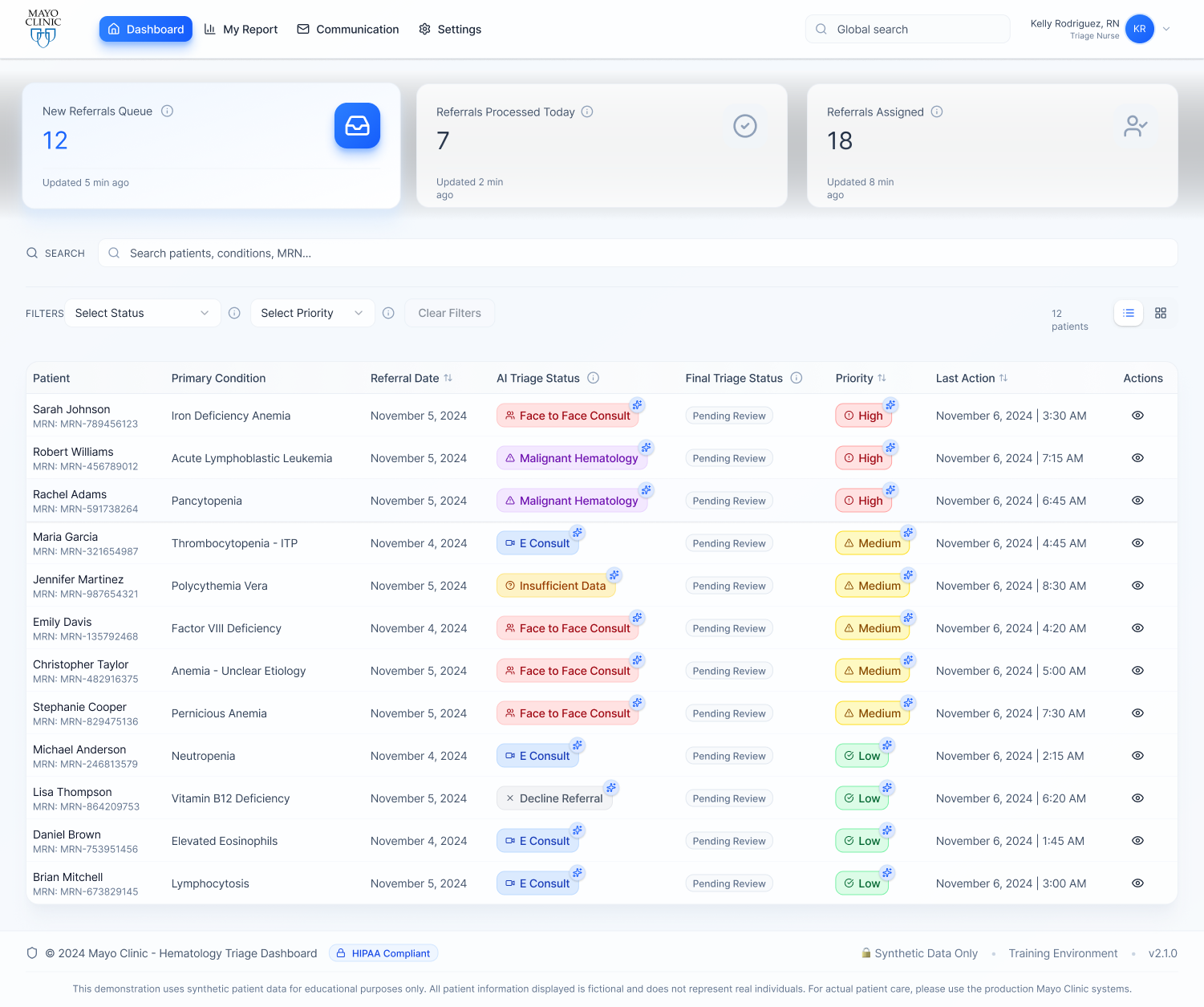
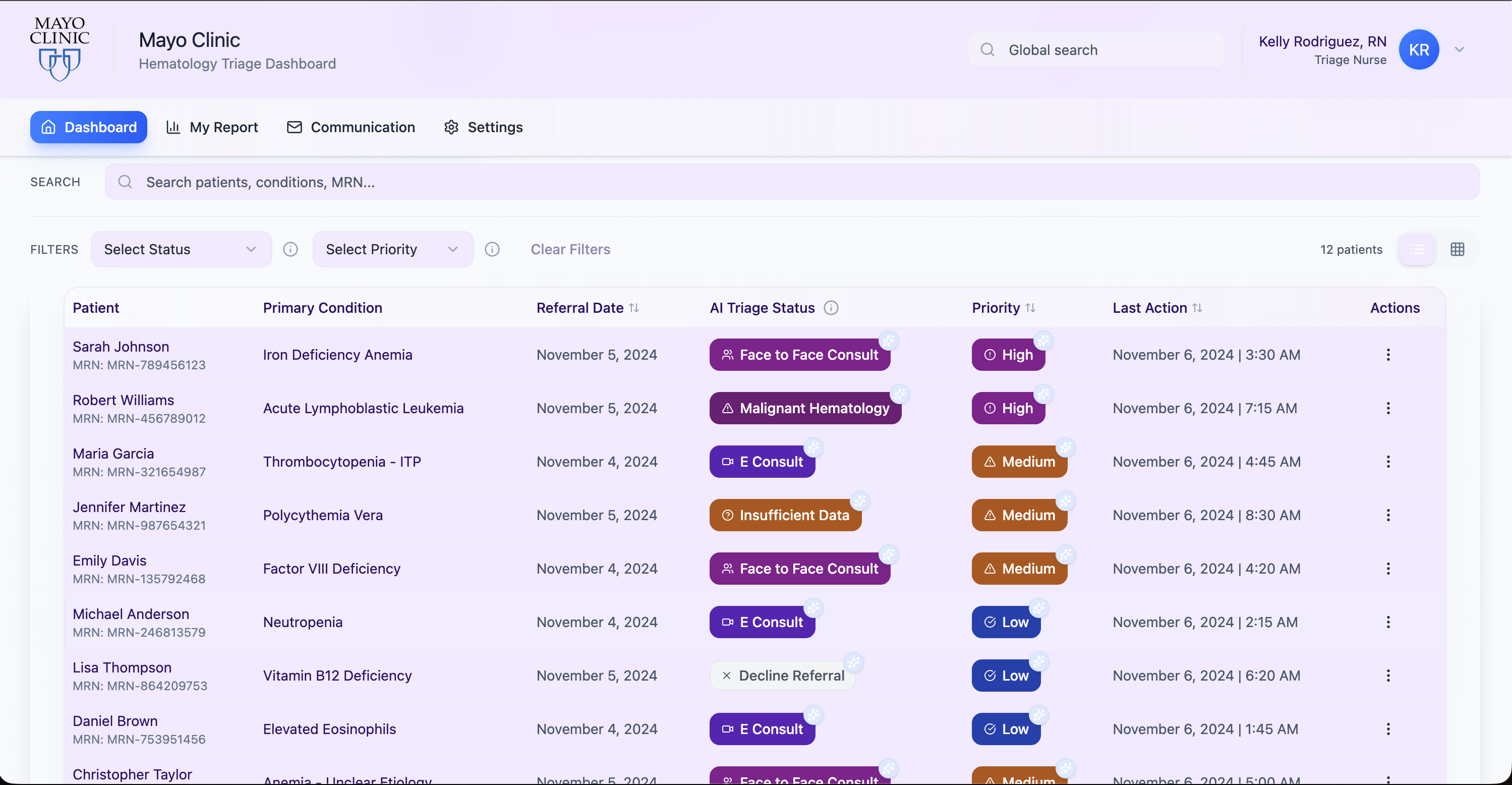
Triage Dashboard & Referral Queue
- Centralized view of incoming referrals with status, priority, and last action at a glance.
- Global search and filters support quick sorting and first-pass triage.
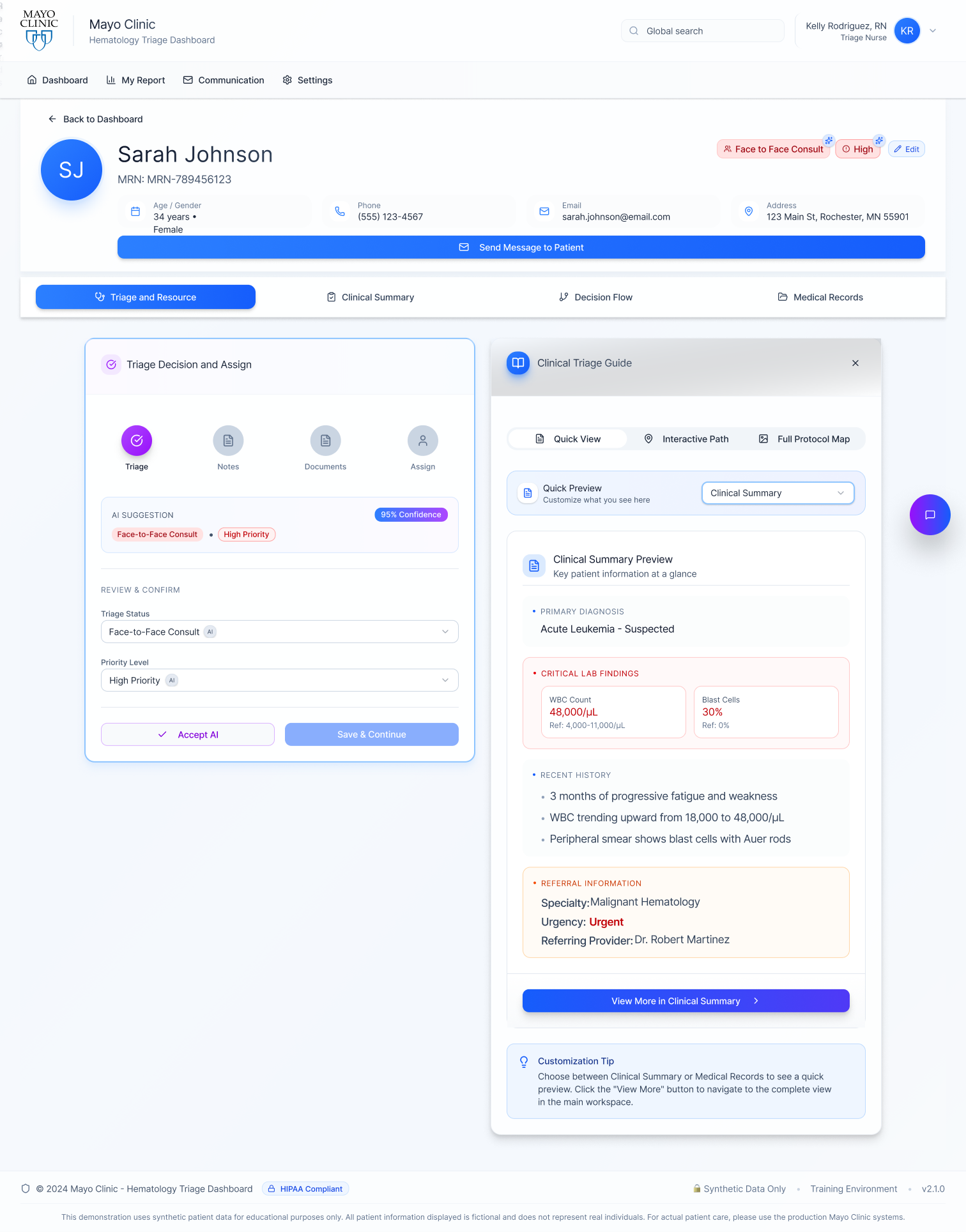
Triage Overview & Decision Workspace
- Primary workspace for reviewing patient context and making triage decisions.
- Allows clinicians to accept or modify AI-assisted triage recommendations.
- Keeps key clinical information visible to support quick, informed decisions.
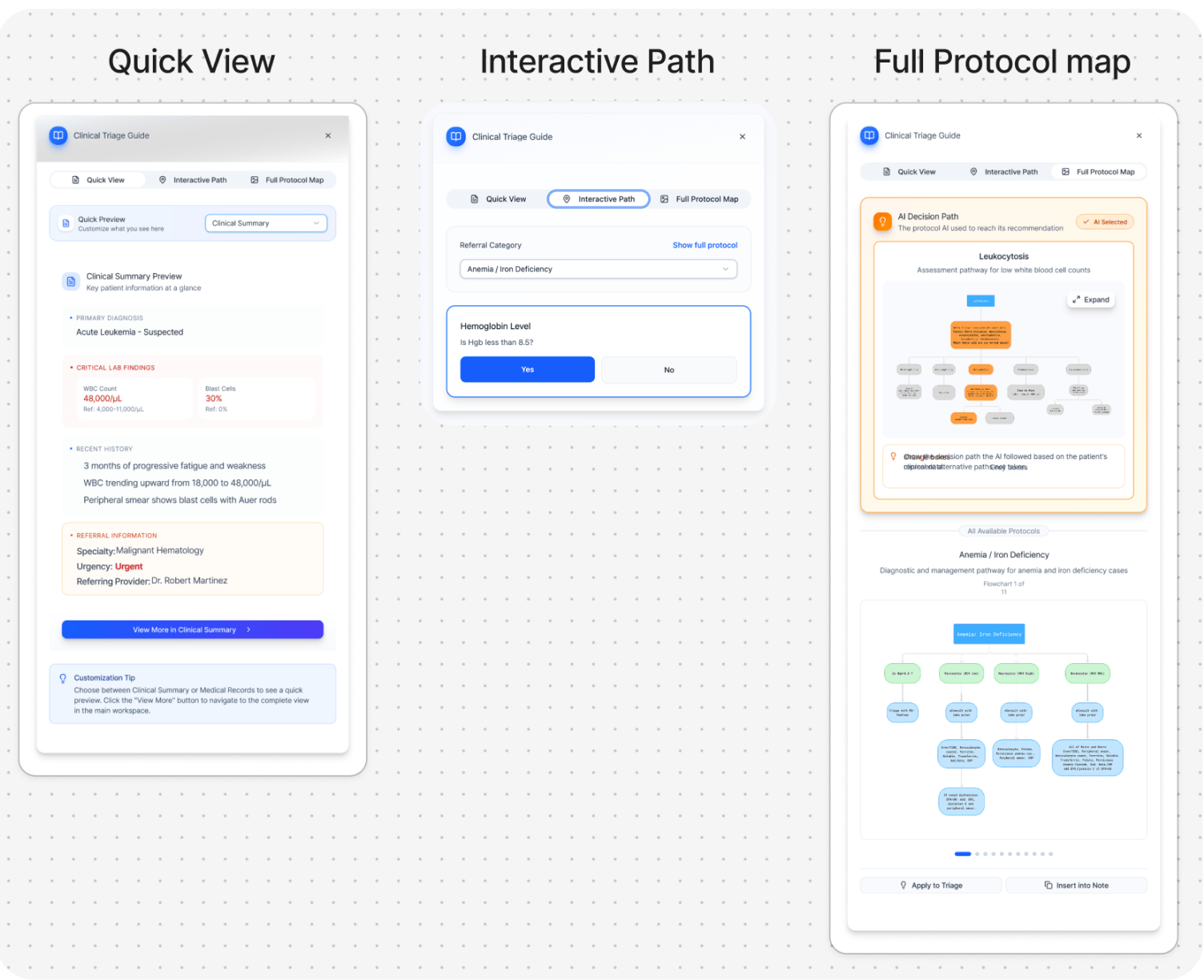
Clinical Triage Guide - Provides three quick-access views that allow clinicians to make fast triage decisions when detailed review is not required, supporting efficient first-pass triage.
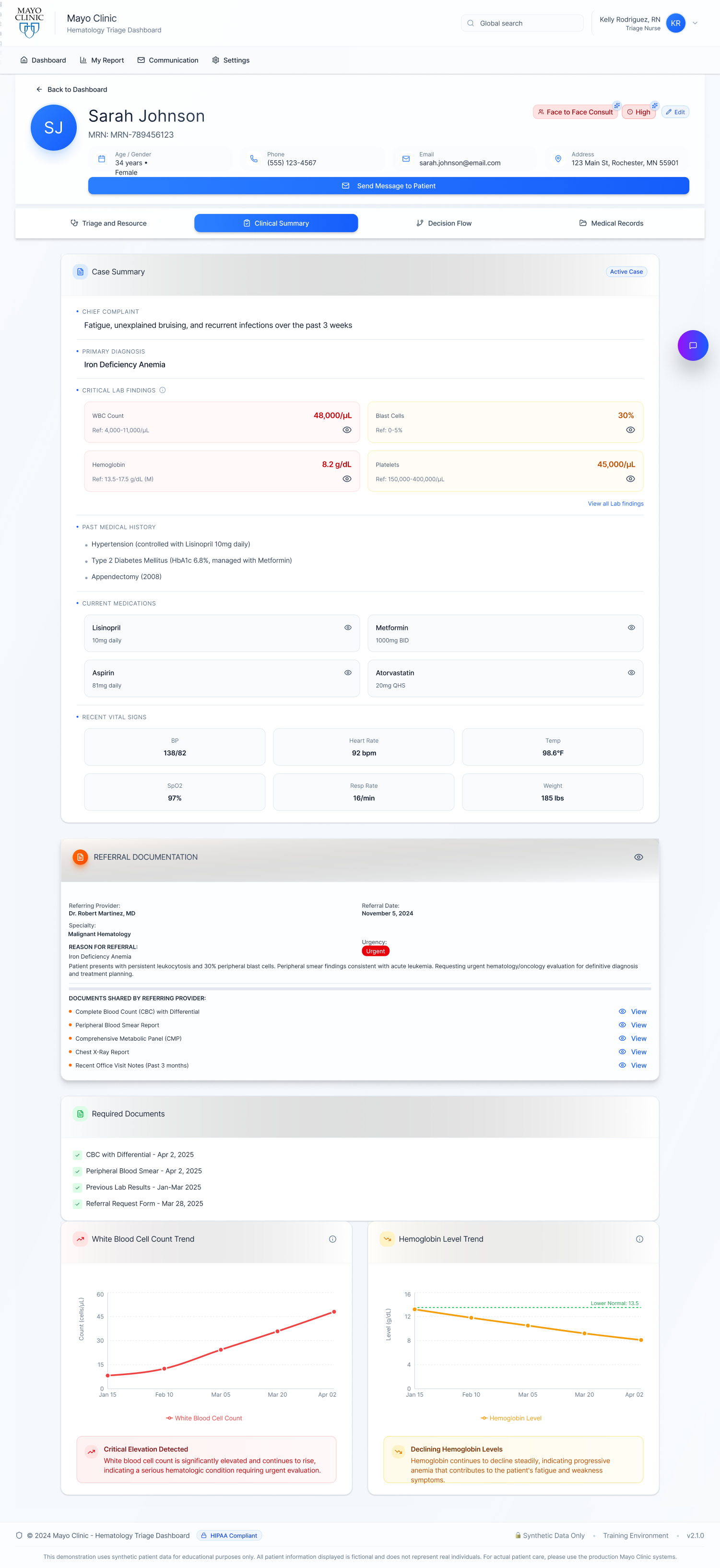
Clinical SummaryConsolidates referral details, lab results, EHR data, and past medical history into a single, high-level overview.
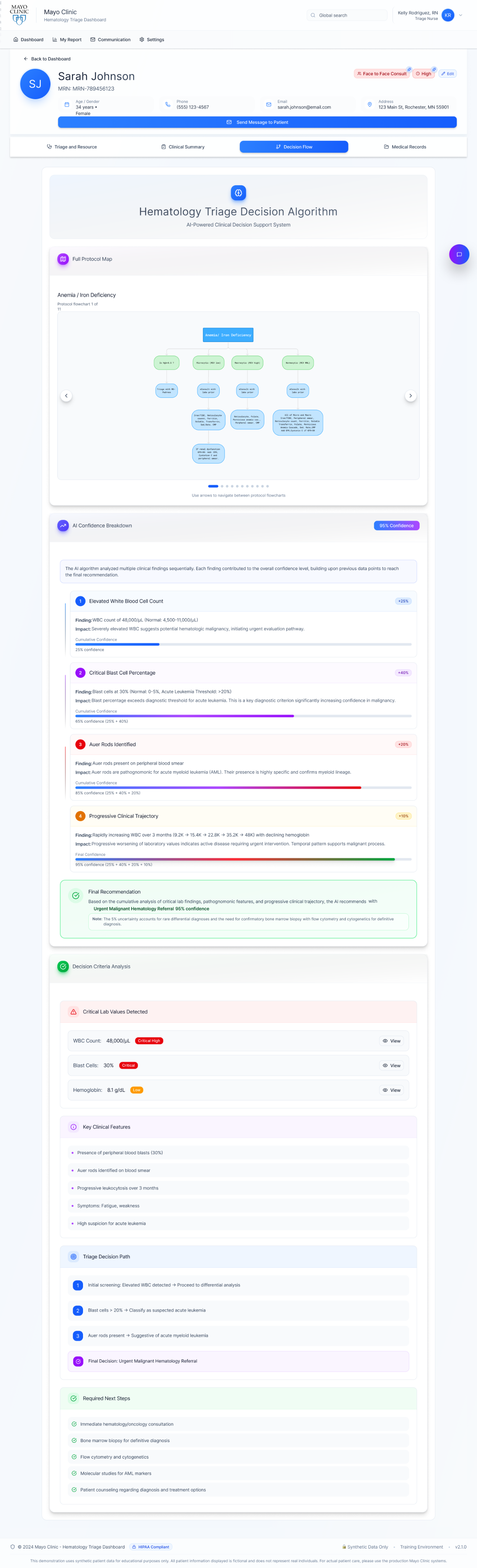
Decision Flow
Aligns with the clinical decision charts nurses already use, showing the AI’s predicted outcome with confidence percentages and the key contributing signals (labs, trends, referral data) to support verification and trust.
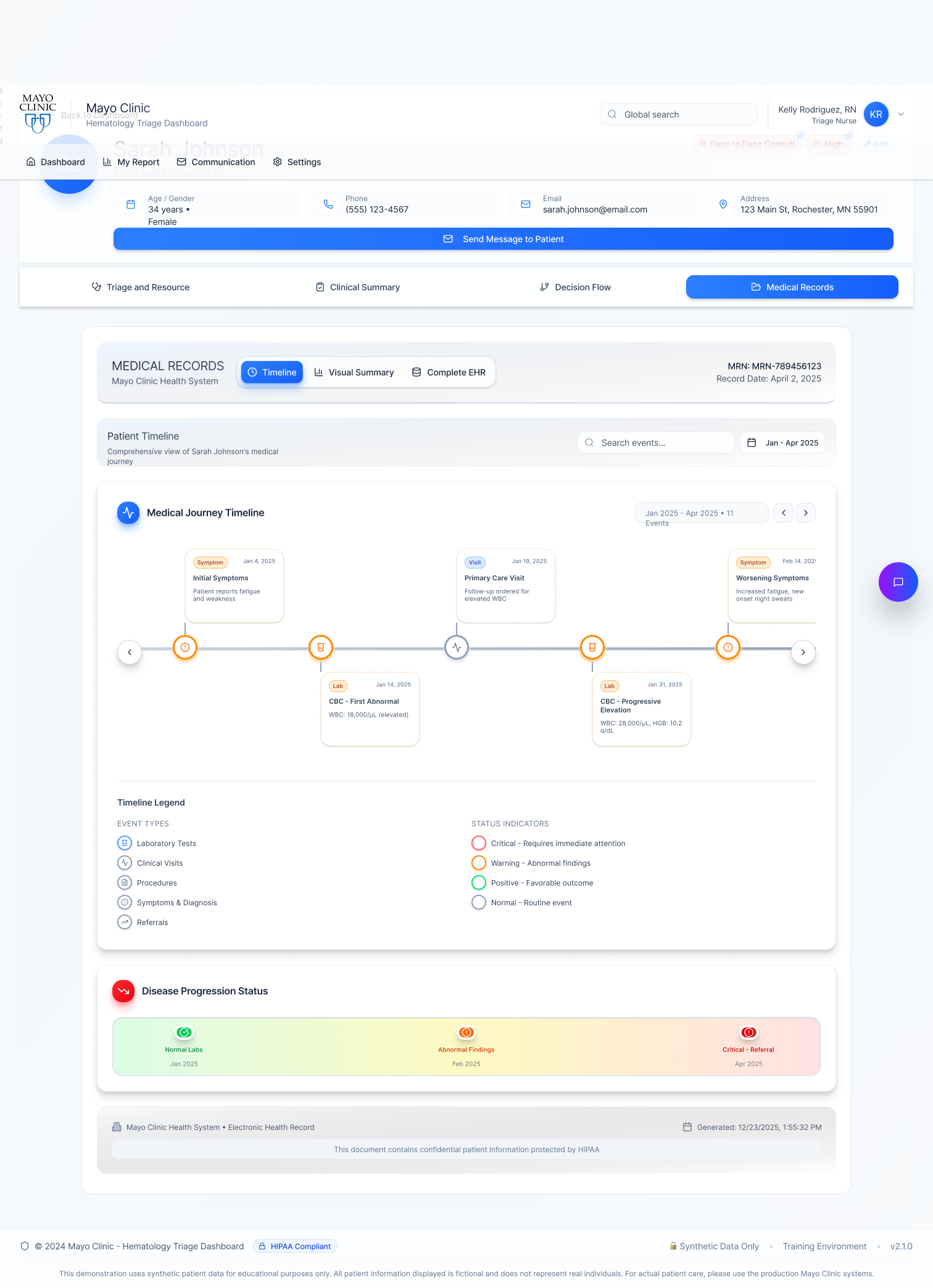
Patient Timeline
- Displays the patient’s medical record over a selected time period in a chronological timeline.
- Highlights laboratory tests, clinical visits, procedures, symptoms and diagnoses, and referrals in one continuous view.
- Shows disease progression status to help clinicians quickly understand how the condition has evolved over time.
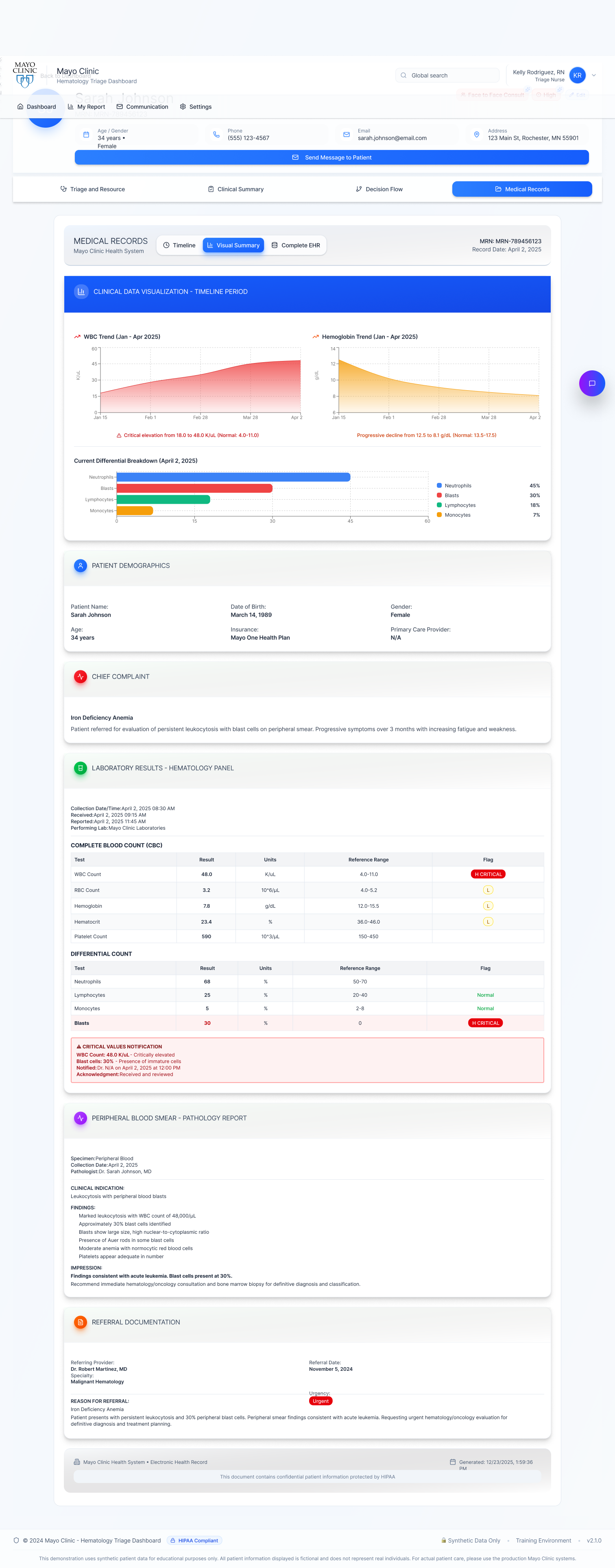
Visual EHRCondenses condition-specific EHR data into focused charts and trends, enabling quick assessment of progression and abnormalities without scanning full records.
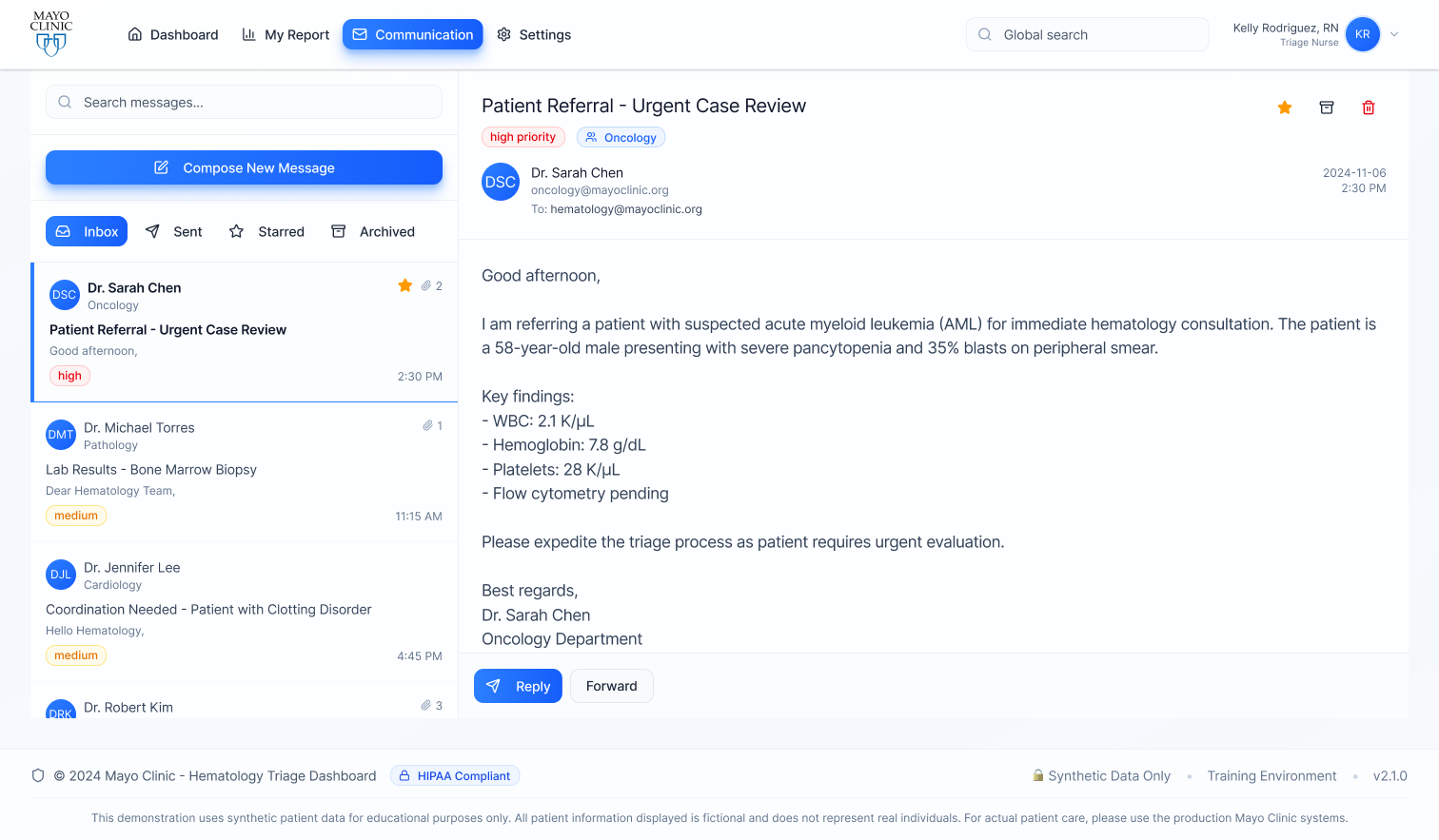
Integrated MessagingProvides an email-like interface for internal team communication and patient outreach, keeping conversations organized and accessible.

Quick Patient ContactAllows direct communication from the patient card with messages automatically recorded in the same thread for continuity and reference.
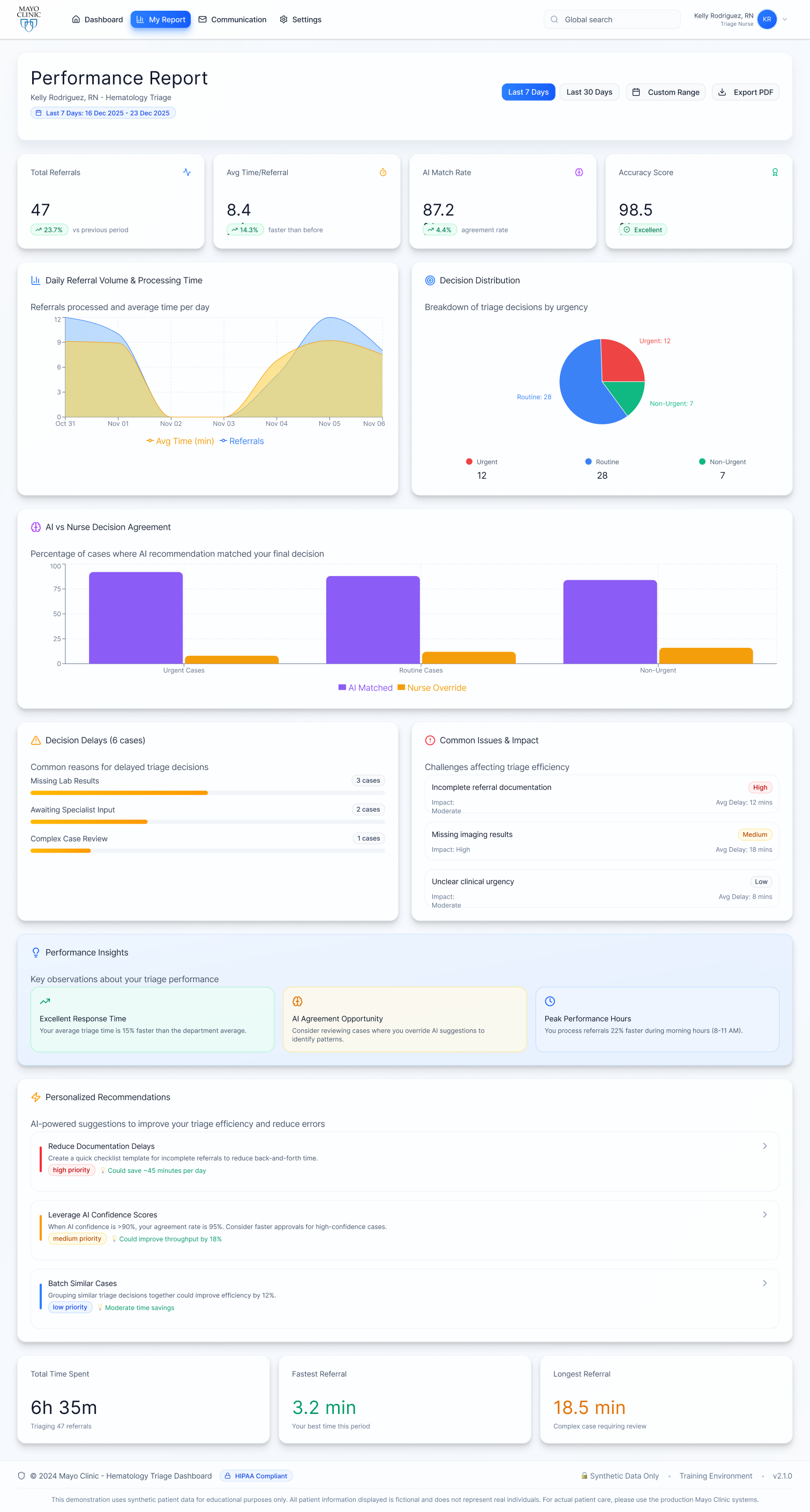
My Report
- Performance & LearningTracks speed, accuracy, and AI agreement to support continuous efficiency gains.
- Operational InsightsHighlights volume, delays, and recurring issues to reduce workflow bottlenecks.
- AI TransparencyDisplays match rates, overrides, and confidence signals to guide system improvement.
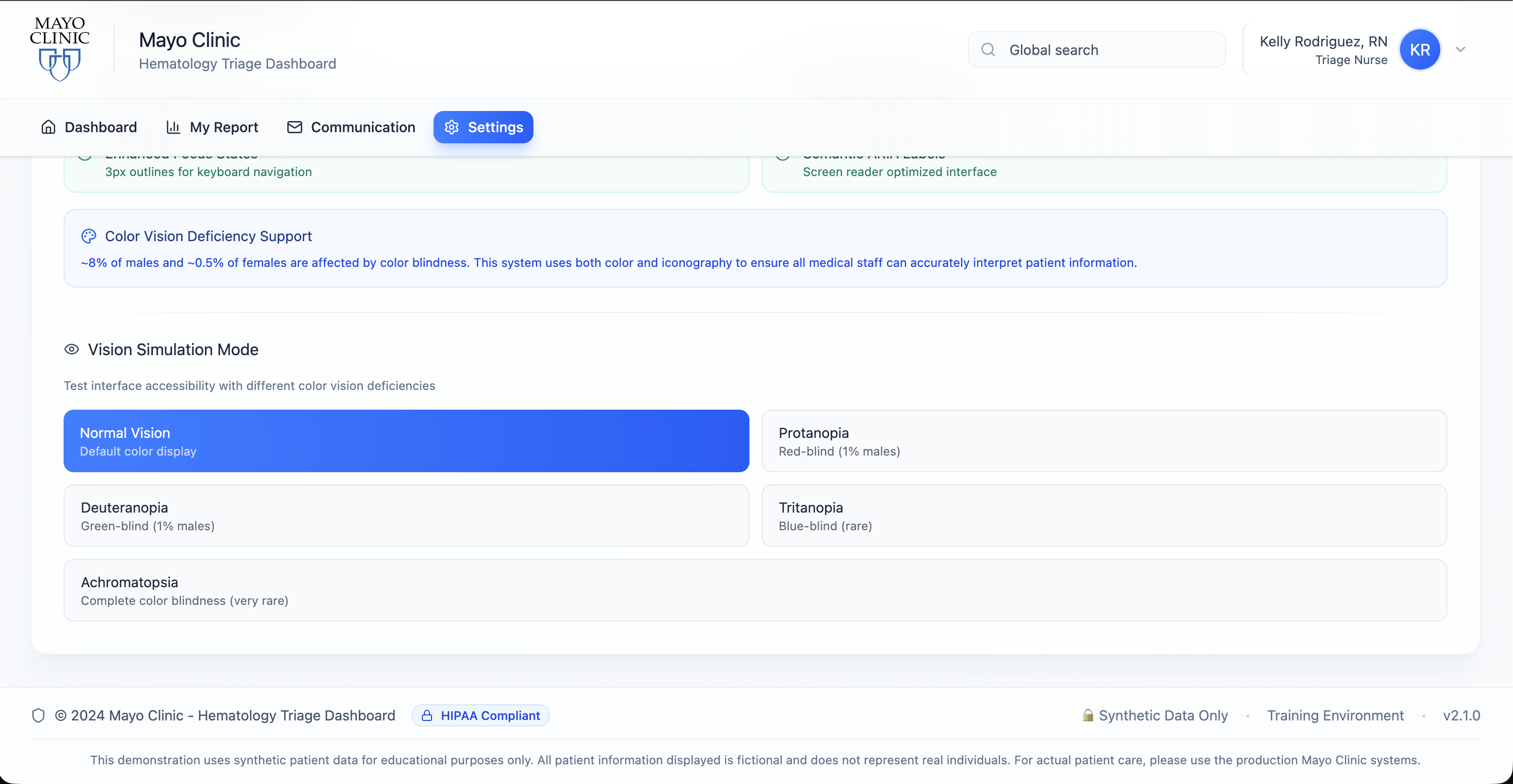
Accessibility Standards
Designed with a WCAG AA–compliant color system supporting users with color vision deficiencies (~8% of males, ~0.5% of females).Includes adaptive modes for Protanopia (red-blind), Deuteranopia (green-blind), Tritanopia (blue-blind), and Achromatopsia (no color), allowing users to personalize visibility.
Deuteranopia & Tritanopia
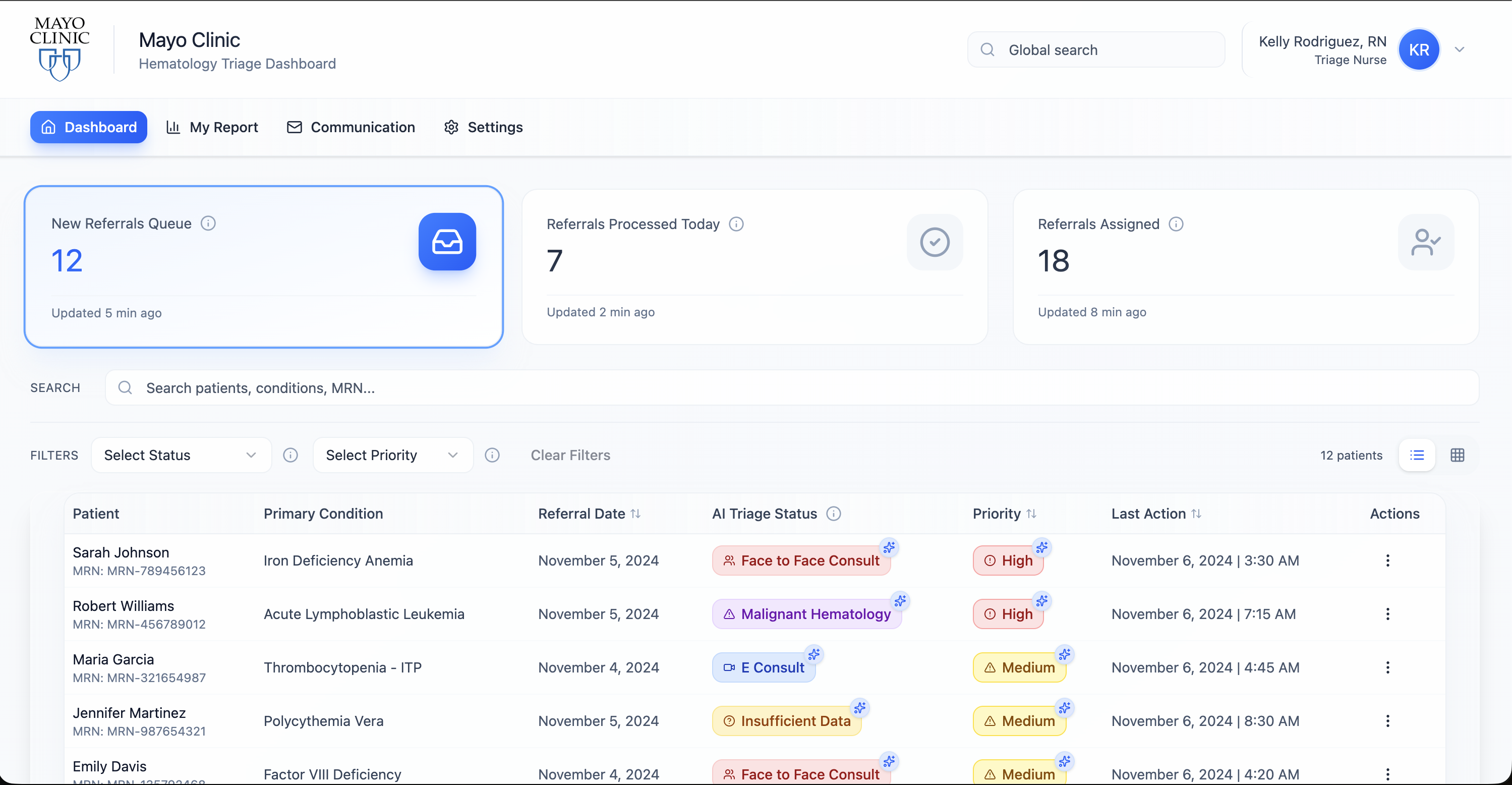
Normal Vision
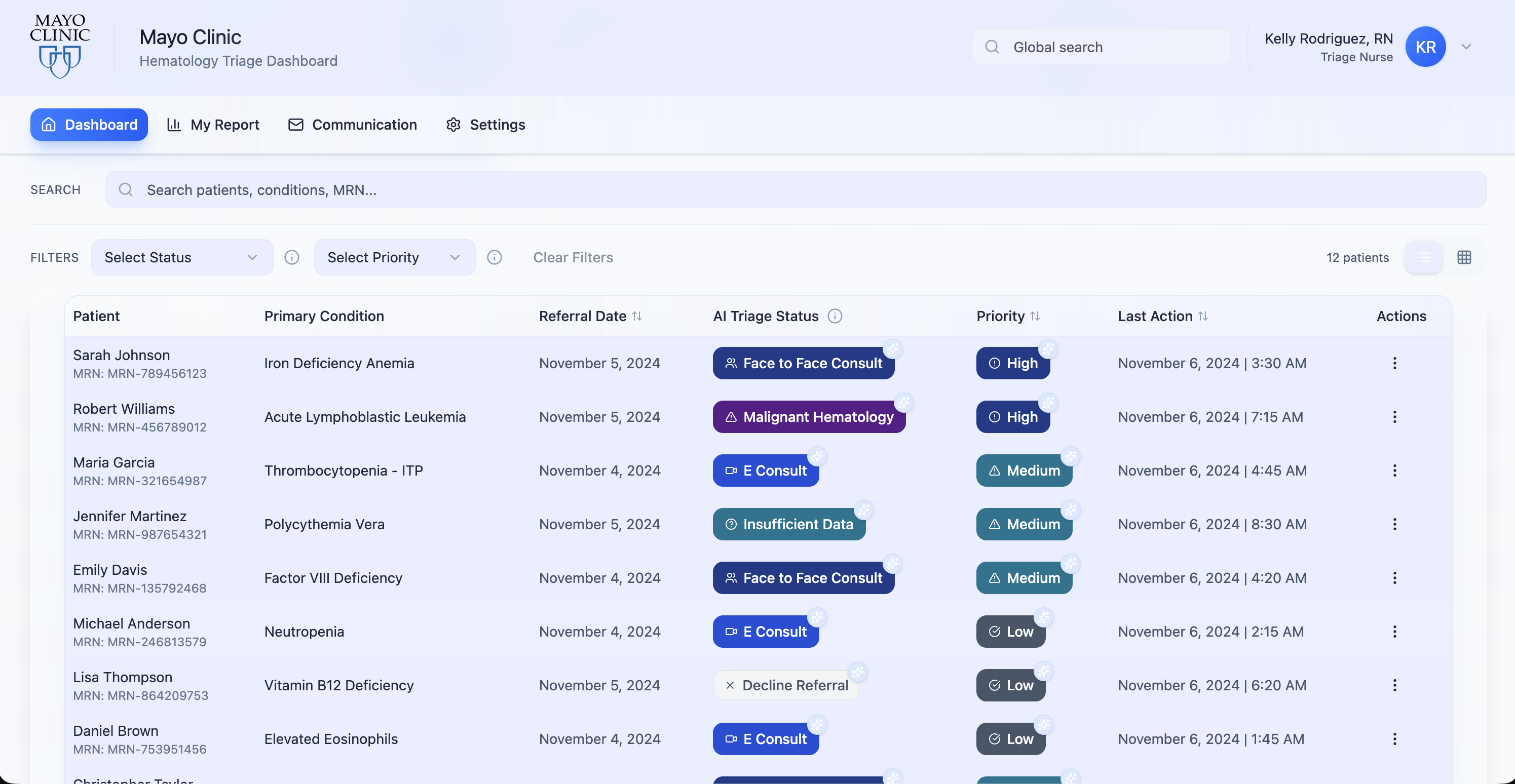
Protanopic
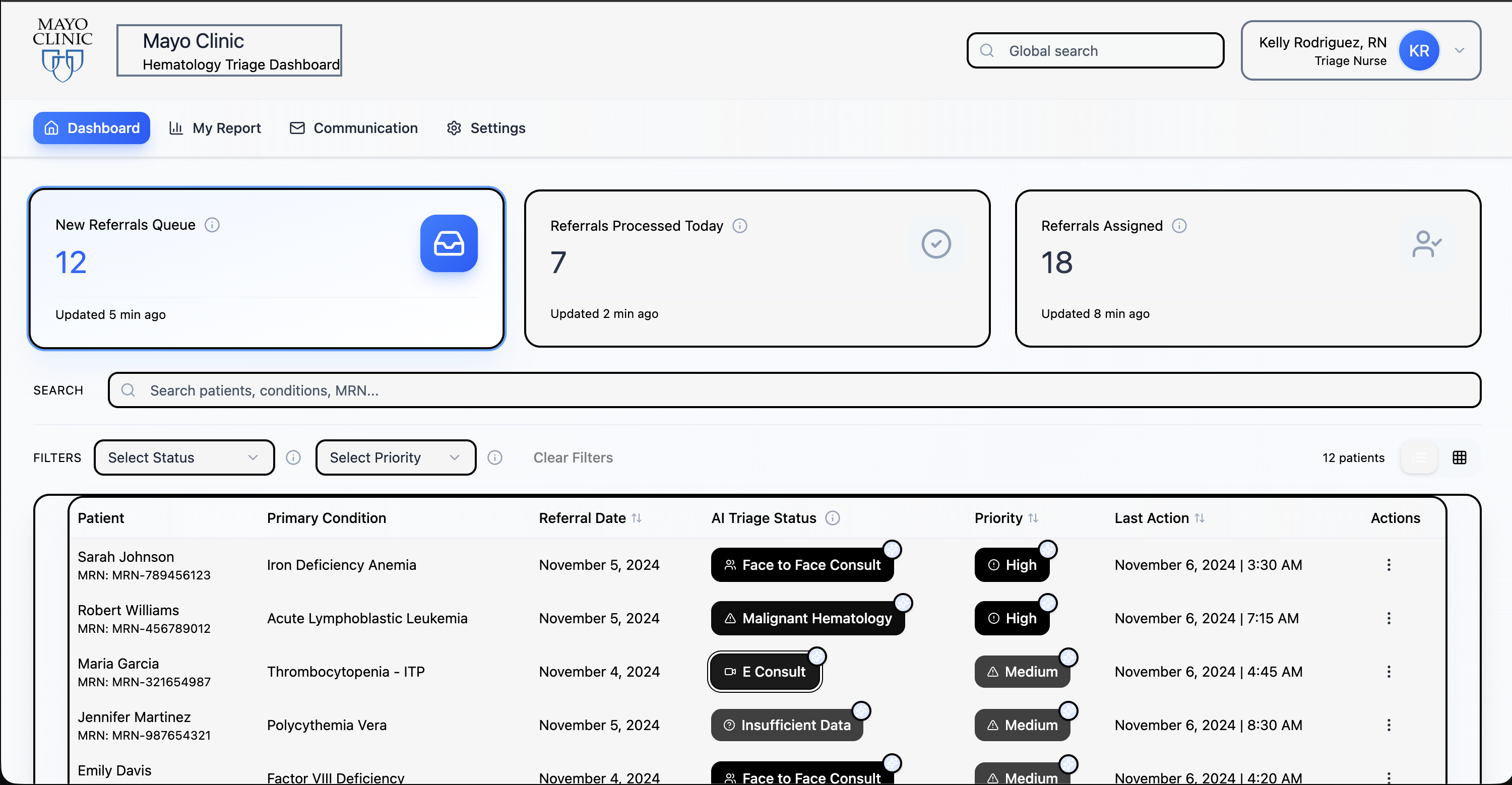
Achromatopsia
Prototype
Explore the interactive prototype to experience the triage workflow firsthand. The prototype demonstrates the complete user journey from initial referral review through final disposition.
View Full Prototype →
Impact & Results
Early deployment showed significant improvements in triage efficiency and clinician satisfaction. The system reduced cognitive load while maintaining clinical decision-making quality.
40%
Reduction in time spent searching for patient information
3x
Faster identification of high-risk cases requiring immediate attention
95%
Nurse satisfaction with new workflow and interface
12-18 min
Average time saved per referral review
"This is the first system that actually feels like it was designed for how we work. I can focus on patient care instead of hunting for information. The AI suggestions are helpful, but I always feel in control of the decisions."
— Hematology Triage Nurse, Post-Implementation
SMART HEMATOLOGY TRIAGE SYSTEM

Mayo Clinic
UX · CX · Human-AI Interaction · 2025 · Timeline - 4 Months
My Role
UX Designer · CX Research · Human-AI Interaction
View Prototype4 - Design
Streamlining Triage Decisions
Through AI-supported visualization
The initial design focused on supporting triage decisions while reducing the time spent interpreting fragmented referral data. The system was built around existing clinical signals and workflows that triage nurses already use today.
The design centers on three key elements:
• AI-assisted triage prediction across five clinically relevant outcomes, paired with a clear priority indicator
• Transparent decision breakdowns showing the factors that influenced each triage suggestion
• Visual patient timelines and EHR views to quickly understand trends and clinical context
Branding & Style Guide
Brand Identity
The design system aligns with Mayo Clinic's established brand guidelines while introducing new components specific to the triage workflow.
Typography
Inter Bold
Main headings • 28px • Bold
Inter Semi Bold
Subheadings • 18px • Semi Bold
Inter Medium
Body text • 16px • Medium
Inter Regular
Secondary text • 14px • Regular
Initial Design
Clinicians responded positively,while also highlighting opportunities to refine the system into a more focused triage experience.
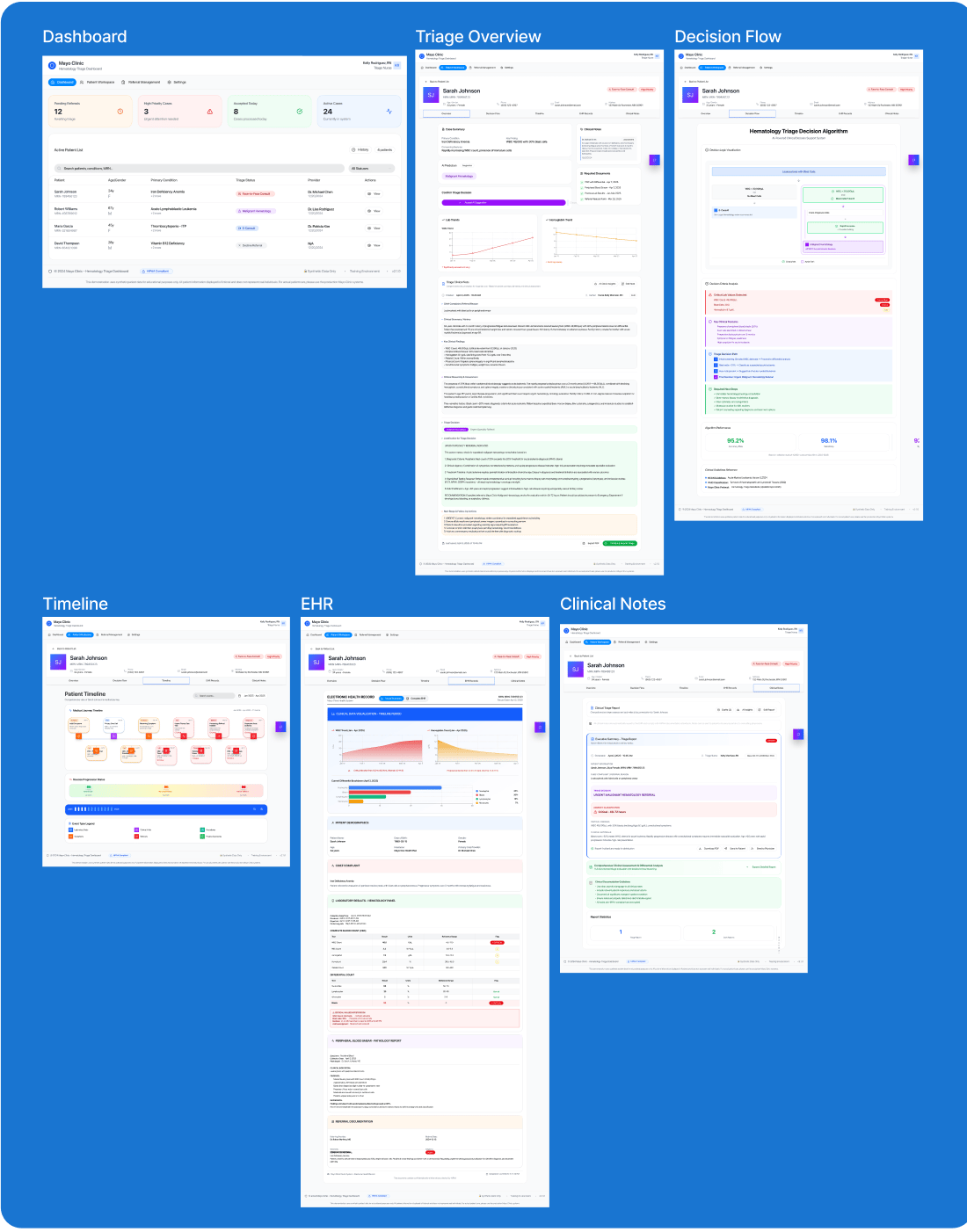
Designing the high-fidelity screens highlighted how critical it is for triage workflows to be fast and seamless. Given the time-sensitive nature of hematology referrals and close collaboration with clinicians, We moved directly into detailed screens to anchor discussions in real practice.
Triage decisions require quickly reviewing labs, referral notes, and patient history. When this information is spread across multiple views, it increases cognitive load and delays action.
We focused on an interface that follows natural clinical workflows surfacing key information at the right moment while keeping supporting details easily accessible.
This approach resulted in a set of high-fidelity screens centered on triage decisions, patient context, and documentation flow.
Design System
A comprehensive design system was developed to ensure consistency across the platform and enable rapid iteration.
Color Palette
Accent
#0066CC
Tertiary
#A855F7
Primary
#F3F4F6
Typography
Inter Bold - Headings
Inter Semi Bold - Subheadings
Inter Medium - Body Text
Inter Regular - Secondary Text
Key Features
Unified Patient View
All relevant patient data consolidated in one place—no more switching between systems. EHR integration brings lab results, imaging, clinical notes, and referral history into a single coherent interface.
AI-Assisted Prioritization
Intelligent flagging of high-risk referrals with transparent reasoning and sources. The AI explains its recommendations and allows clinicians to easily confirm or override suggestions.
Visual Lab Timelines
Trend visualization for quick pattern recognition and anomaly detection. Interactive charts show lab value progression over time, highlighting clinically significant changes.
Contextual Decision Support
Relevant clinical guidelines and decision pathways surfaced at the right moment. Smart notifications alert clinicians to critical findings without overwhelming them.
Collaborative Workflow Tools
Seamless handoffs between nurses, coordinators, and physicians. Clear status tracking and communication tools ensure nothing falls through the cracks.
Future Innovation & Growth Opportunities
This project deepened my understanding of the role UX design can play in healthcare, especially when designing from the perspective of physicians and triage nurses working under intense time and cognitive pressure.
Experiencing these workflows firsthand highlighted the urgent need for more streamlined, supportive systems.
As clinician burnout and workforce shortages continue to challenge the healthcare industry, future innovation must focus on tools that reduce friction rather than add complexity. This work reinforced the importance of human-in-the-loop AI, where AI functions as a companion that saves time, supports decision-making, and preserves human accountability. Strong clinical CX, paired with assistive AI, presents a critical opportunity to scale care safely while keeping clinicians at the center.


Human-AI Collaboration
Continued research on optimal balance between AI assistance and human autonomy in high-stakes clinical decisions


Ethical AI Frameworks
Developing governance models for transparent, accountable AI in healthcare settings


Cross-Specialty Expansion
Adapting the triage framework for cardiology, oncology, specialties facing similar challenges
Healthcare Triage Dashboard
Mayo Clinic Collaboration
UX Design Case Study • 2025
Designed with clinicians, for clinicians
Product video
Problem Statement
Healthcare Triage Crisis
Hematology Triage Nurses Can Spend an Estimated 4–6 Hours Per Shift Managing High-Volume Referrals Across Fragmented Systems
The healthcare system loses over $90 billion annually to administrative inefficiencies. Nurses spend 20–40% of triage time searching across disconnected systems (EHRs, lab platforms, and imaging tools) before they can even begin clinical decision-making. In hematology, where delays can postpone cancer diagnosis by weeks, this data fragmentation creates real clinical risk. The problem isn't nurse expertise. It's systems that don't support fast, high-stakes decisions.
Quantified Reality
20–40%
Time spent searching, not deciding
~45%
Referrals arrive incomplete
12–18 min
Lost per referral to data hunting
50–60%+
Nurse burnout linked to workload
Design Process
1 - Research
The Triage Burden:
Understanding Referral Workload, Time Pressure, and Clinical Risk
“I’m trained to make clinical decisions, but most days I’m just trying to keep up with referrals.”
Hematology Triage Nurse
We collaborated closely with 6+ hematology physicians and multiple triage nurses to understand the lived reality of referral triage. Through direct workflow observation, one-on-one interviews, and survey-based analysis, we conducted both qualitative and quantitative research to capture how triage decisions are made under real clinical constraints.
What emerged was not a problem of missing expertise, but one of sustained cognitive pressure. Nurses described spending most of their shift processing referrals continuously balancing speed, accuracy, and patient safety with little margin for pause.
Triage decisions often occur after long hours of screen time, back-to-back cases, and mounting fatigue. In this environment, the fear is not making the wrong decision but missing a critical signal because of exhaustion or time pressure.
These patterns appeared consistently across clinicians and became the foundation for deeper quantitative analysis in the following section.
Observing triage work in real time and interviews revealed a consistent pattern: clinical reasoning often begins only after prolonged cognitive and navigational effort. Nurses described spending long stretches of each shift reviewing referrals under pressure knowing that every case could represent a serious malignancy, and that missing a signal could have life-altering consequences.
"By the time I'm ready to make a decision, I'm already mentally exhausted."
— Hematology Triage Nurse
"I want to think clinically, but most of my time is spent just getting to a point where I can."
— Hematology Triage Nurse
These insights reinforced that the problem is not clinical skill, but the cognitive cost of triaging complex referrals at scale, across fragmented systems and under constant time pressure.

78%
of nurses described triage as mentally exhausting before clinical judgment begins

72%
reported high anxiety about missing critical information during referral review

67%
said decision confidence drops significantly later in long shifts

83%
expressed the need for clear, visual patient summaries before deciding
Qualitative Research
Quantitative Research
To validate our qualitative observations, we conducted quantitative research using structured surveys focused on triage time, system usability, and decision confidence. The results closely aligned with our interview findings and highlighted systemic inefficiencies embedded in referral workflows.
Clinicians consistently emphasized the importance of remaining in control of triage decisions, even when supported by intelligent systems. Automation without transparency was viewed as unsafe, while explainable, assistive AI was seen as valuable.
.
60–70%
of triage time is spent reviewing and assembling referral context not deciding
3–5 systems
accessed on average per referral during triage
82%
reported that contextual & visual patient timelines & EHR would significantly reduce triage effort
100%
agreed that AI must support, not approve clinical decisions
2 - Synthesis
How might we save clinical time by designing a triage system that is fast, trusted, and easy to use?
Across the literature review and stakeholder research, one clear insight emerged: delays in classical hematology referrals are driven less by clinical complexity and more by time lost navigating fragmented systems. Clinicians spend valuable time searching across screens for referral notes, lab trends, and patient history before they can act. What they need is not another triage tool, but a trusted system that reduces this time burden - bringing information together, supporting faster decisions, and keeping clinicians in control while AI remains transparent and accountable.

Time Is the Bottleneck
Clinicians spend a significant portion of their day navigating records rather than making decisions. In hematology referrals, time lost to searching and switching systems delays care. The design must prioritize speed and efficiency by reducing steps, minimizing navigation, and bringing the right information into one place.

A System, Not Just a Tool
Triage does not happen in isolation. It depends on labs, documents, timelines, and handoffs. Clinicians need a system that supports the entire triage workflow, not a standalone feature. Information should be organized around decisions, not scattered across interfaces.

Accountable AI Support
AI can help summarize and prioritize, but clinicians must always understand and control its output. The system should explain why suggestions are made, show supporting data, and allow easy overrides. AI is used to assist decisions, not make them.
Personas
Through clinical observations and interviews, I identified three primary user types who interact with the triage system daily.
Hematology Triage Nurse
Handles first-pass triage for incoming referrals and determines urgency under time pressure.
"I spend most of my time finding labs and notes before I can even start thinking through the case."
Attending Hematologist
Reviews complex referrals while balancing clinic responsibilities and limited time.
"A lot of my time goes into piecing together charts instead of making the actual decision."
Triage Coordinator
Tracks referral status, lab completion, and follow-ups across patients and providers.
"The information is in the EHR, but I have to jump across tabs and reports to understand what's going on."
This highlighted a core design challenge:
How might we reduce triage time by bringing efficiency and required clinical data together in one coherent system?
3 - Ideation
Exploration of Ideas:
How I arrived at the triage system
Using affinity mapping, concept mapping, and ongoing discussions grounded in hematology triage workflows, I explored ways to reduce this time burden while keeping decision-making efficient and clinically sound.
Initial Concepts
AI-assisted triage support with priority and risk indicators
AI-powered summaries of referrals highlighting key findings
Visual representations of EHR data and patient timelines
These early ideas focused on improving speed and clarity during triage by organizing information around how clinicians actually work, rather than introducing isolated tools.
User Flow
Streamlined Triage Workflow:
Designed Around Clinical Reality
The user flow was shaped by observing how triage nurses and clinicians move through referrals under constant time pressure. Rather than changing how decisions are made, the focus was on reducing the effort spent navigating records before those decisions can begin.
The flow brings referral details, lab results, patient history, and timelines into a clear sequence that aligns with existing triage routines. Information is structured to support quick review and prioritization without requiring users to move across multiple EHR screens.
This approach reflects real clinical workflows, where efficiency, clarity, and accountability are critical when managing high referral volumes.
NAVIGATION
Login
Mayo Clinic

Main App
Nav Bar
Dashboard
Default
My Report
Analytics
Comm
Messages
Settings
HIPAA
DASHBOARD
Metrics
3 Cards

Filters
Search
Table
List/Block


Yes
Patient Workspace
Header + Tabs
Triage Tab
Clinical
Decision
Timeline
EHR
View Patient?
TRIAGE TAB
State 1
Default
AI Rec
92%
Priority
High
Pending
No
Yes
State 3
Decided
Provider
Assigned
Open Guide?
Decide?
State 2
Guide Open
Guide 50%
Card 50%
DECISION
Nurse Action
Confirm/Override
Provider
Required
Complete
Assigned
Dashboard
Updates
Confirm AI?
AI Match
#005EB8
↓ or ↓
Override
#1C8B9F
TAB DETAILS
CLINICAL
Demo
RBC (8)
WBC (5)
DECISION
Chart
Nodes
Path
TIMELINE
Diagnosis
Treatment
Labs
EHR
Docs
View
Upload
STATUS FLOW
New Referral
No status
Decide
Processed
Today
Assign
Assigned
Provider
Dashboard
Real-time
KEY WORKFLOWS
1
New Referral Triage
•
Dashboard → New Referrals
•
View Patient → Triage Tab
•
Review AI → Make Decision
•
Assign → Processed Today
2
Filter & View
•
Click Metric Card
•
Filters Applied
•
Click View Button
•
Workspace Opens
3
Patient Navigation
•
In Workspace
•
Sidebar Patient List
•
Click Patient
•
Data Updates
Entry
Primary
Detail
AI
Complete
Override
Initial
4 - Design
Streamlining Triage Decisions
Through AI-supported visualization
The initial design focused on supporting triage decisions while reducing the time spent interpreting fragmented referral data. The system was built around existing clinical signals and workflows that triage nurses already use today.
The design centers on three key elements:
AI-assisted triage prediction across five clinically relevant outcomes, paired with a clear priority indicator
Transparent decision breakdowns showing the factors that influenced each triage suggestion
Visual patient timelines and EHR views to quickly understand trends and clinical context
Branding & Style Guide
Status Color System
Priority
High
#DC2626
Medium
#D97706
Low
#10B981
Triage
Face to Face
#FFE2E2
Malignant Hem.
#EDE9FE
Decline Referral
#F3F4F6
Additional
E Consult
#DBEAFE
Insufficient Data
#FEF3C7
Brand Identity
Typography
Inter
Aa
Semibold
The quick brown fox jumps over the lazy dog
Regular
The quick brown fox jumps over the lazy dog
Primary
#F3F4F6
Accent
#0066CC
Tertiary
#A855F7
User Testing
Clinicians responded positively,while also highlighting opportunities to refine the system into a more focused triage experience.
The initial testing consisted of 5 doctors and the ML researcher at Mayo Clinic.
Through observed usage, think-aloud walkthroughs, and post-testing interviews, key gaps in the triage flow surfaced, guiding improvements to clarity and efficiency in first-pass triage.
- Triage Overview Density: The initial overview was intentionally comprehensive and works well once users are familiar with the system. For new users, simplifying what appears first supported faster focus during initial triage while preserving depth over time.
- Workflow Order: During think-aloud sessions, clinicians naturally moved between related sections. Combining these steps into a single flow better matched their mental model and reduced navigation effort.
- Familiar Clinical Visuals: Using charts already common in current practice helped clinicians orient more quickly and reduced the learning curve through familiarity.
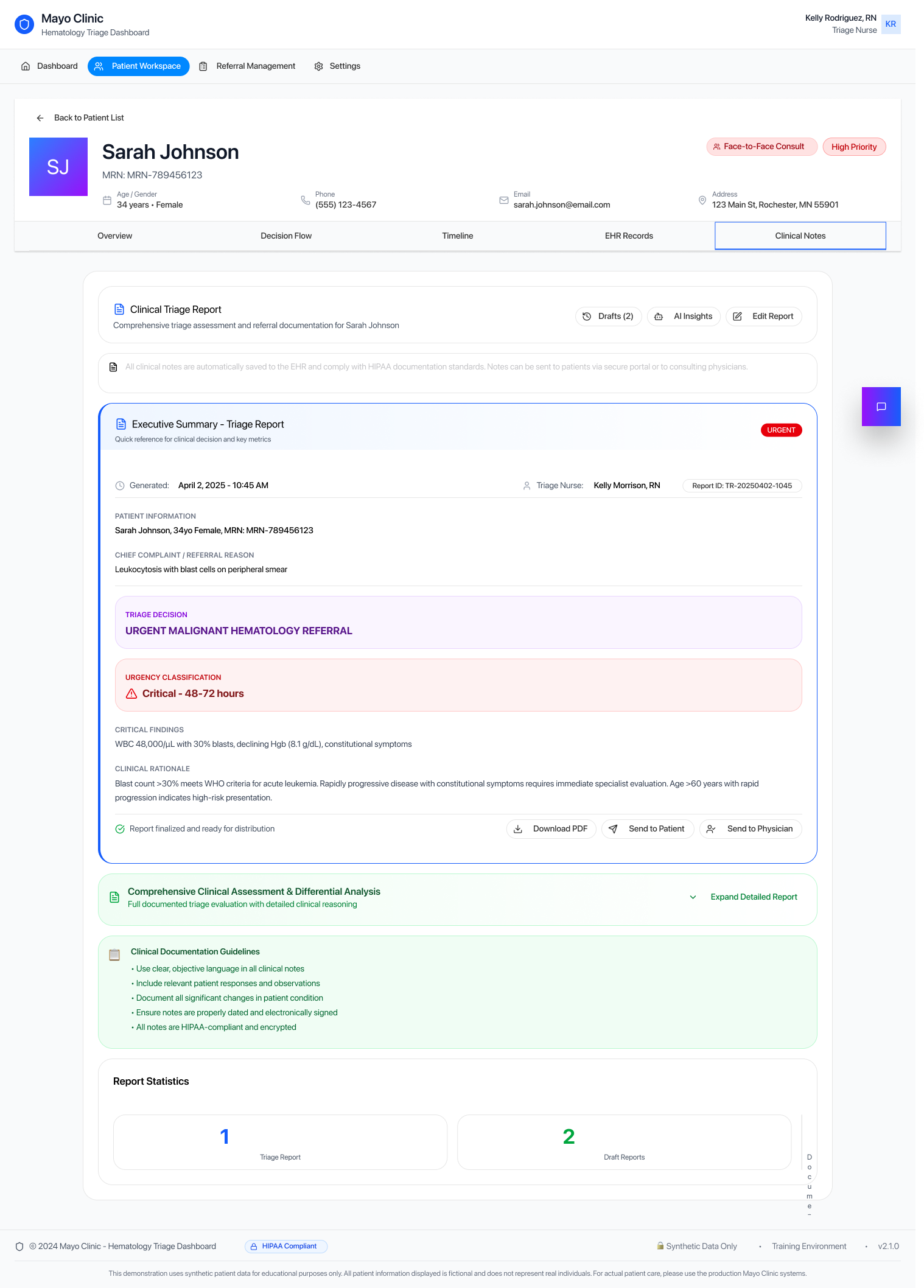
- Integrated Documentation: Placing clinical notes within the triage overview supported a more continuous, in-context decision-making process.
5-Final Design
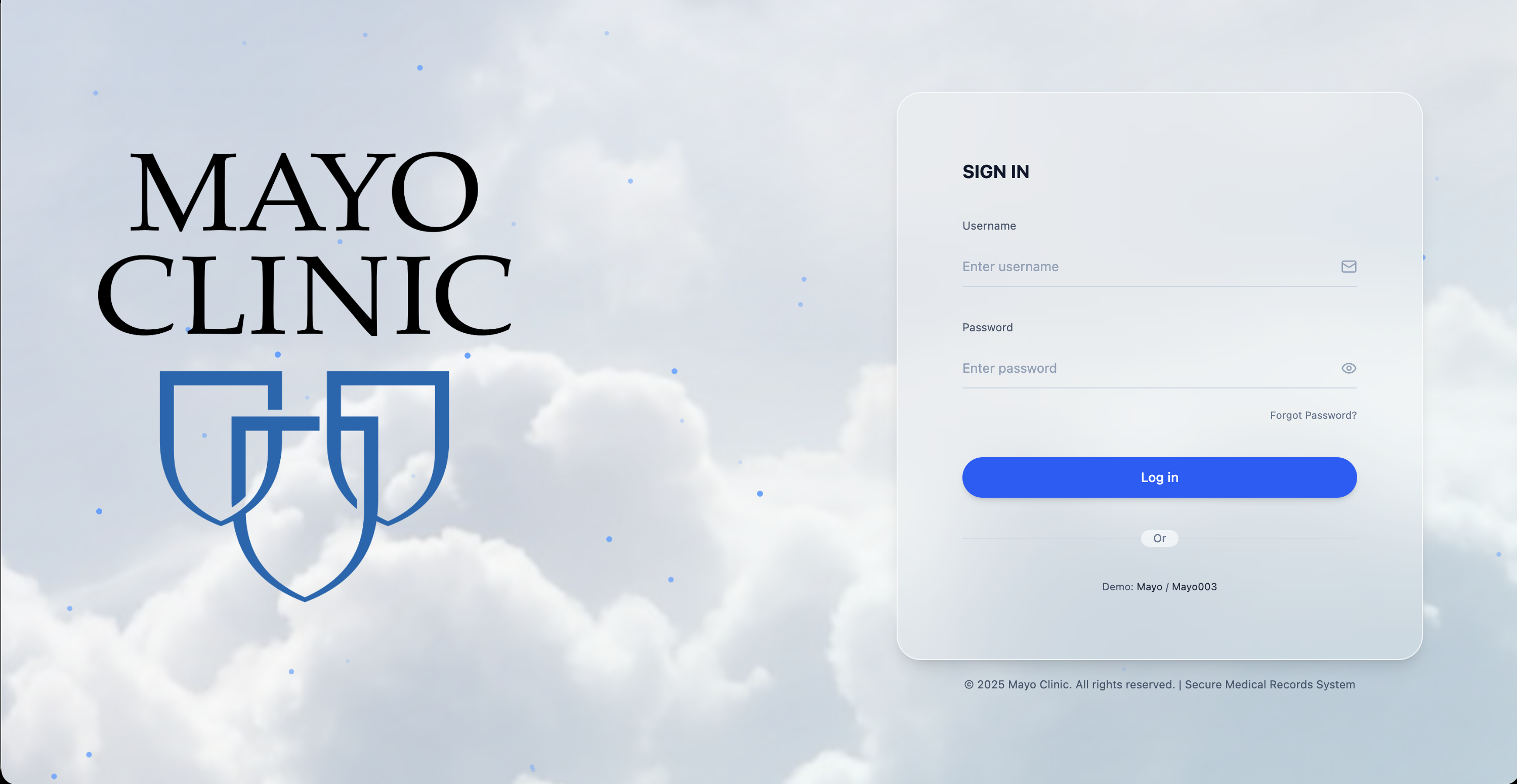
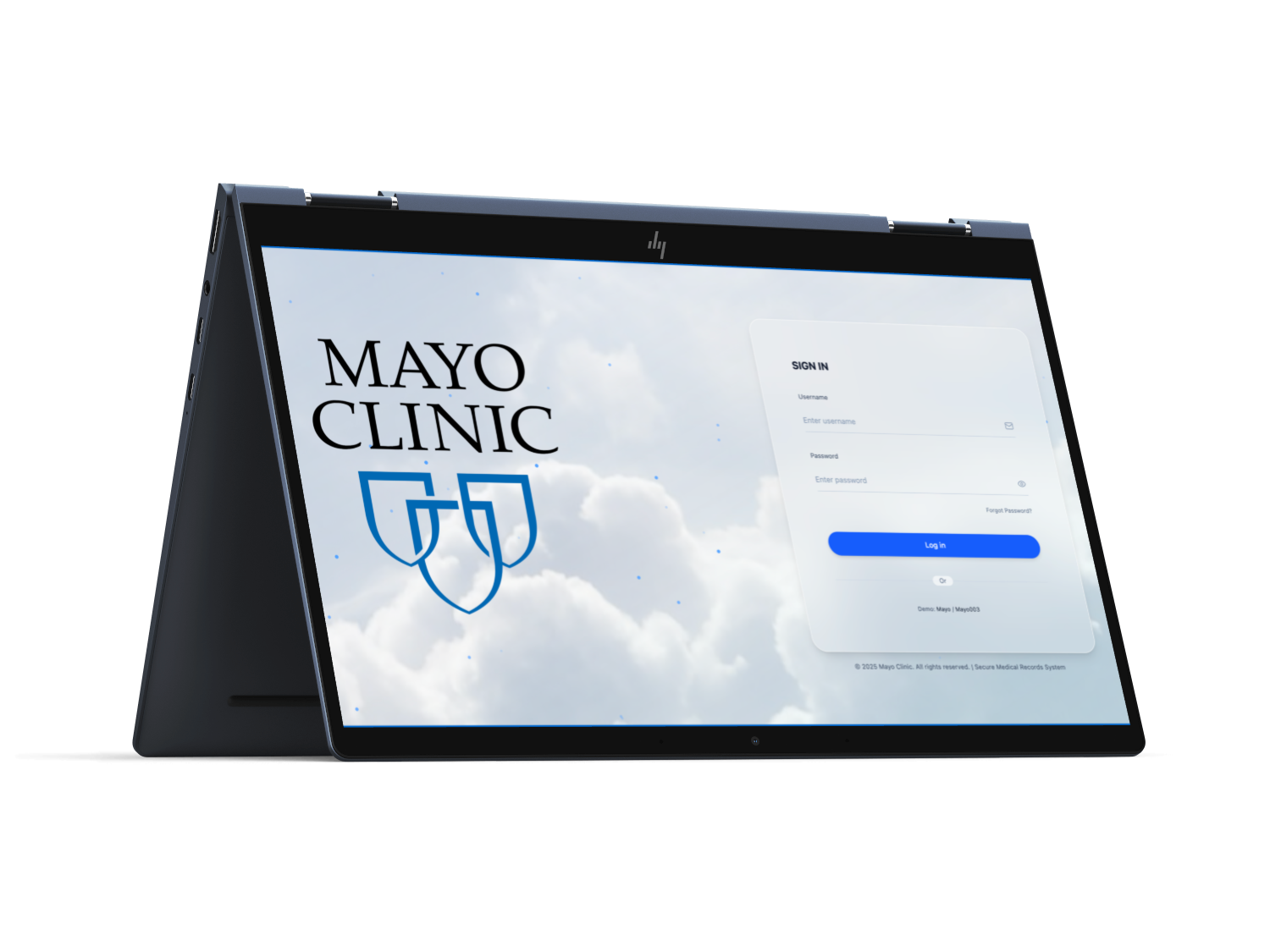
Login & Access
A clean, secure entry point enables clinicians to access the triage system quickly with minimal friction.
Dashboard
Triage Overview
Decision Flow
Timeline
EHR
Clinical Notes
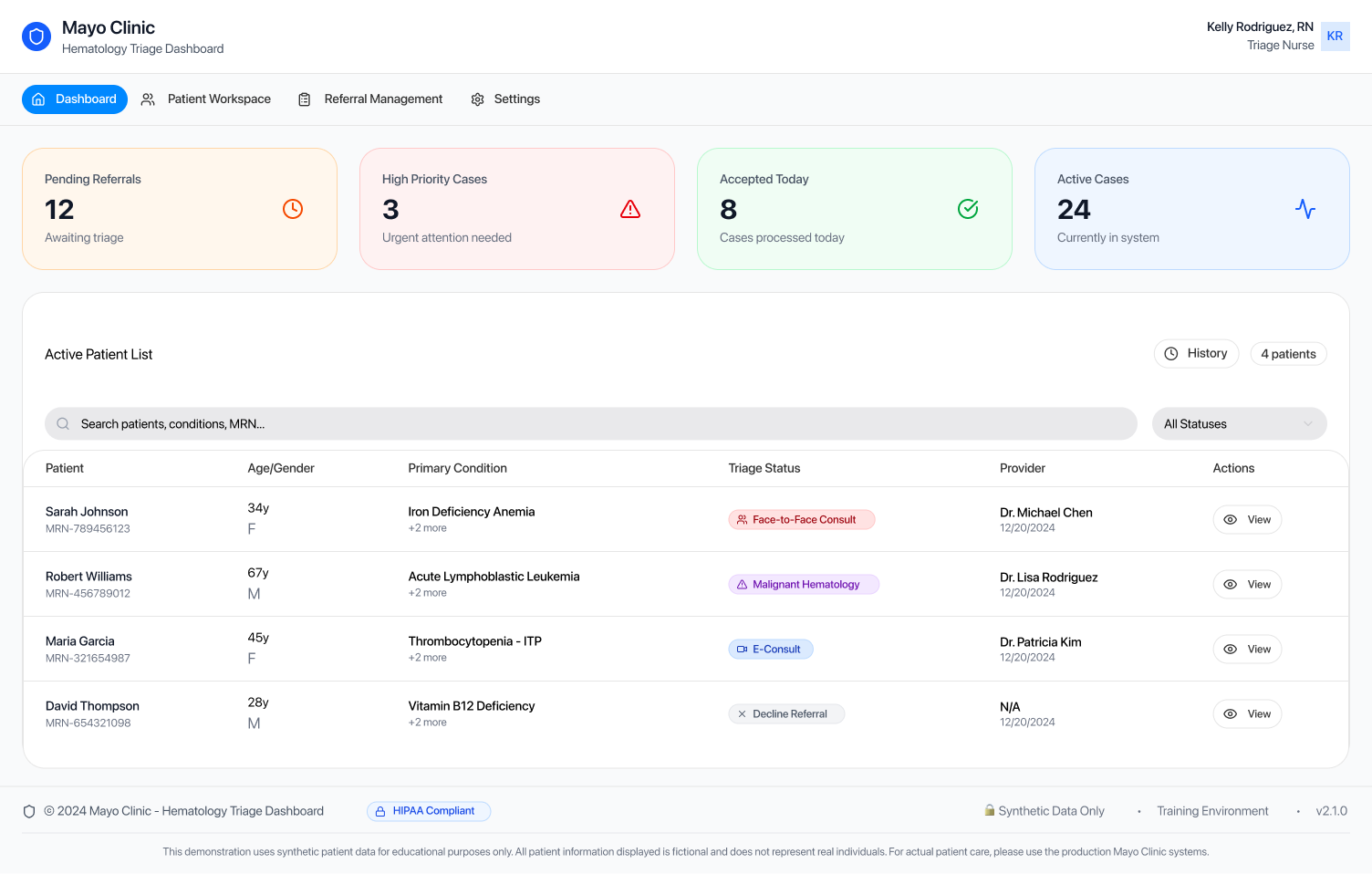
Triage Dashboard & Referral Queue
- Centralized view of incoming referrals with status, priority, and last action at a glance.
- Global search and filters support quick sorting and first-pass triage.
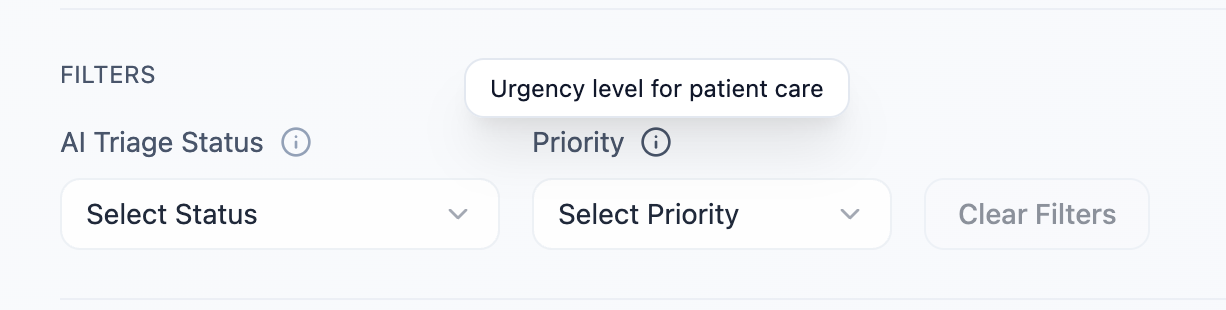

Contextual TooltipsUsed to explain key components, support different levels of technical familiarity, and improve accessibility without adding clutter.
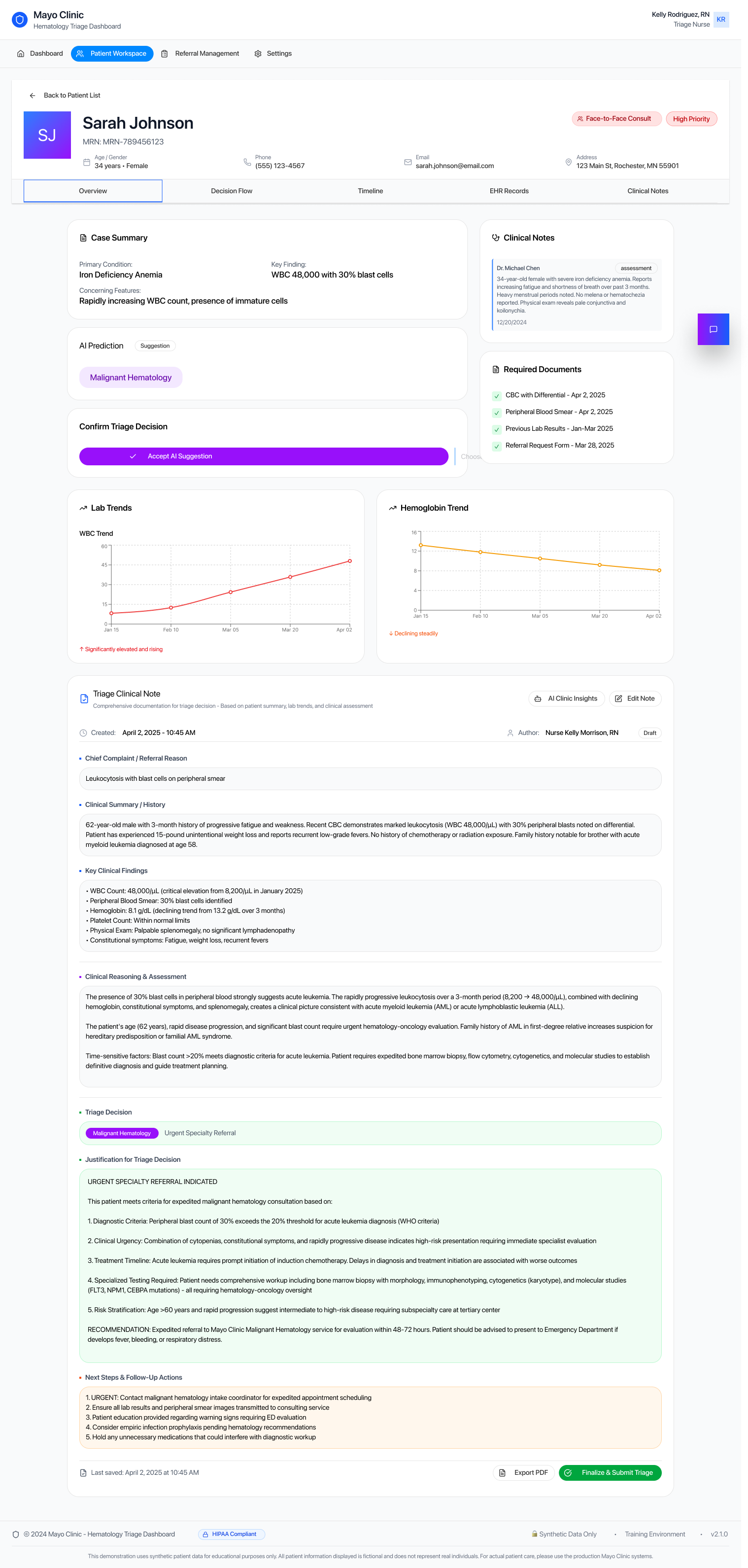
Triage Overview & Decision Workspace
- Primary workspace for reviewing patient context and making triage decisions.
- Allows clinicians to accept or modify AI-assisted triage recommendations.
- Keeps key clinical information visible to support quick, informed decisions.
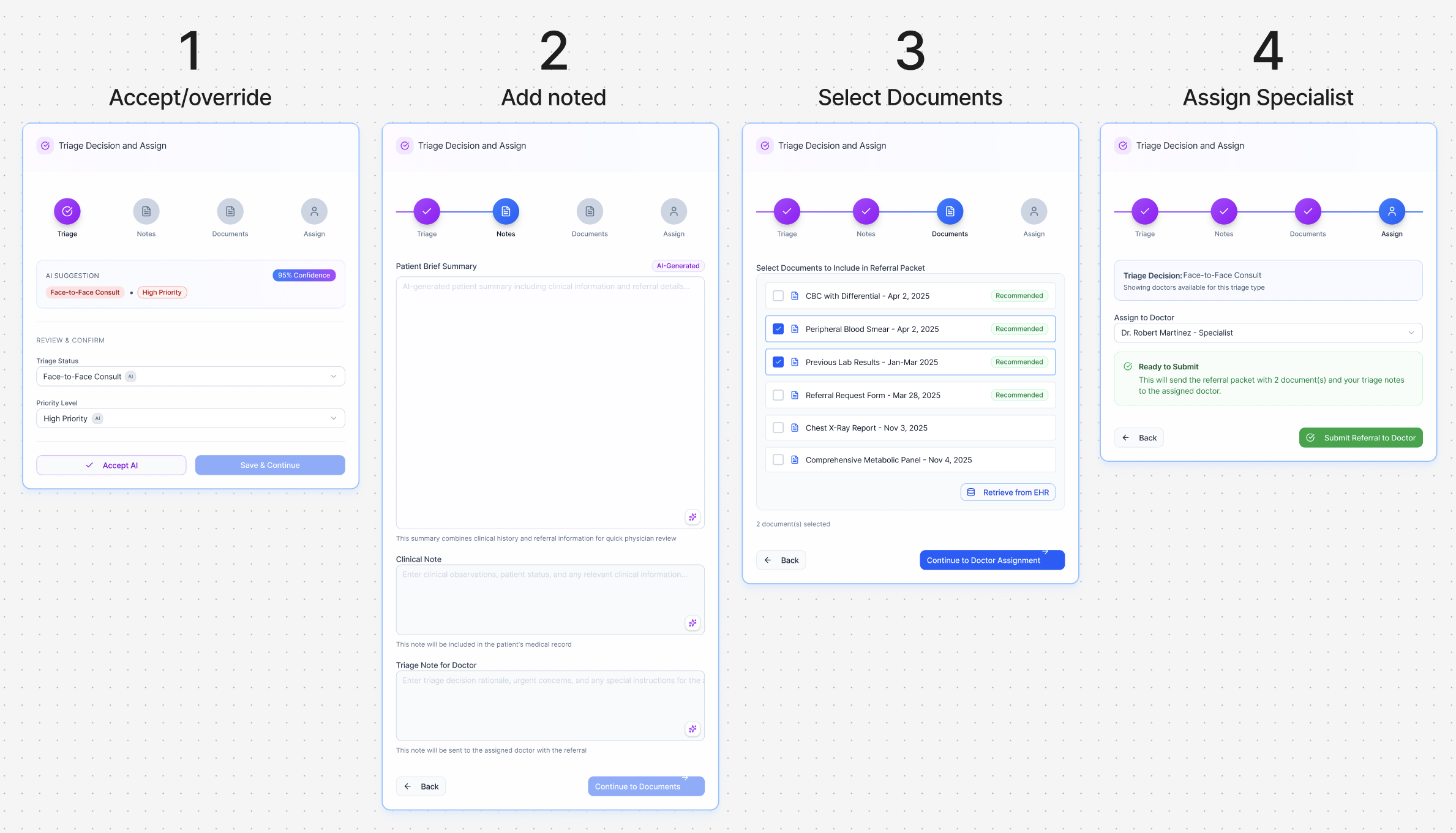
Triage Actions - 4 Simple steps
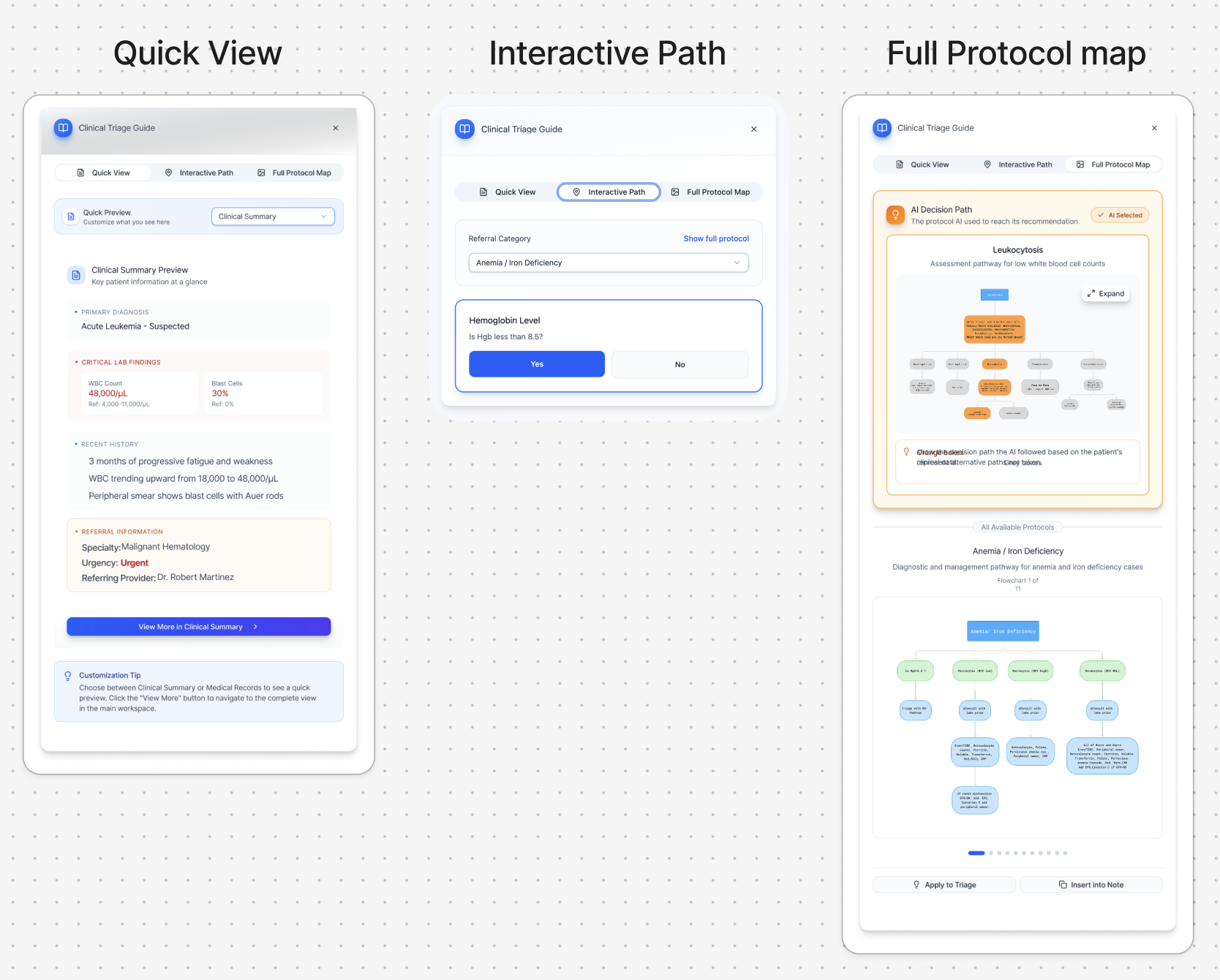
Clinical Triage Guide - Provides three quick-access views that allow clinicians to make fast triage decisions when detailed review is not required, supporting efficient first-pass triage.
Clinical SummaryConsolidates referral details, lab results, EHR data, and past medical history into a single, high-level overview.
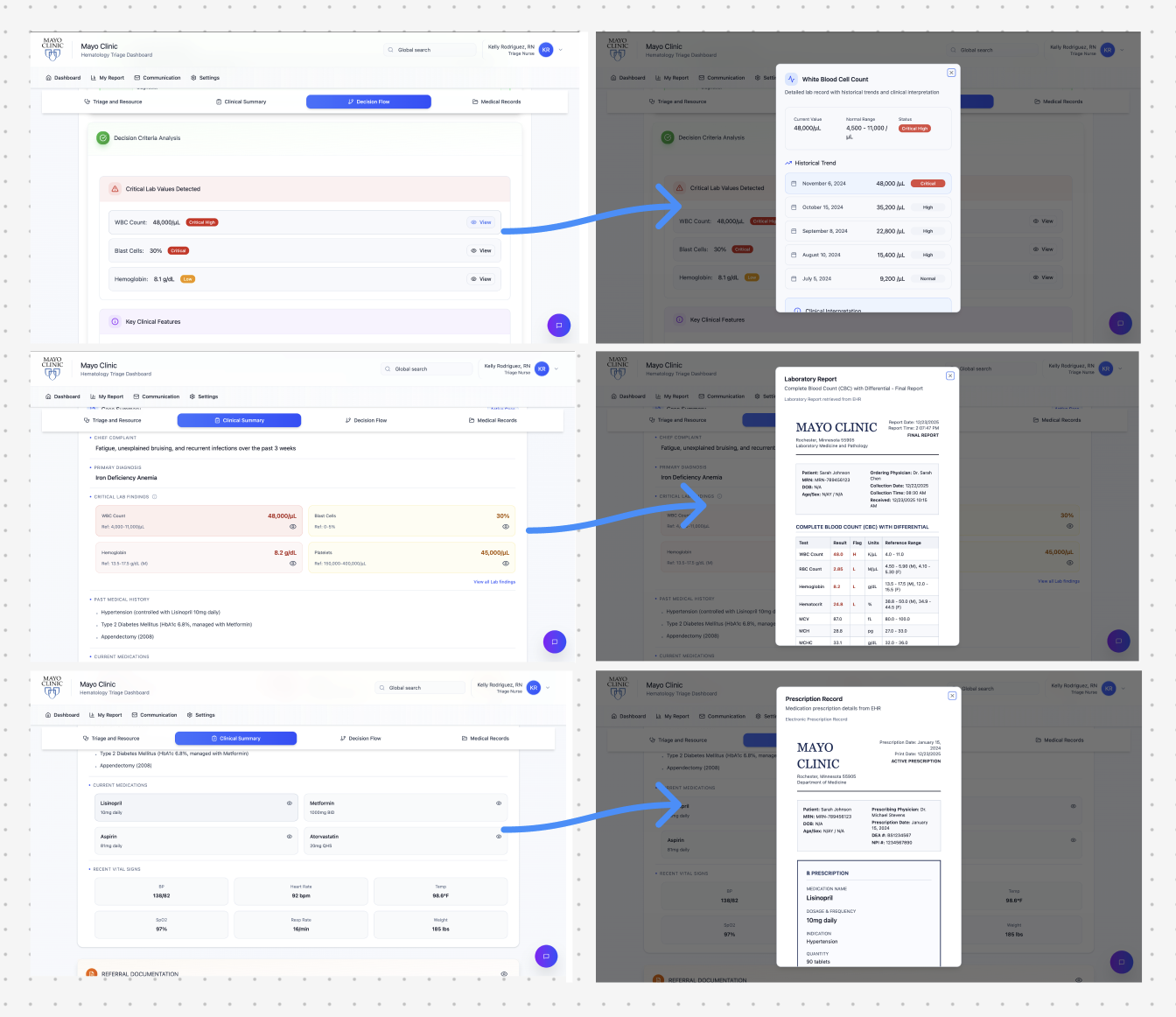
Summary View Options - Allows clinicians to switch between focused views to review each summary area in more detail as needed.
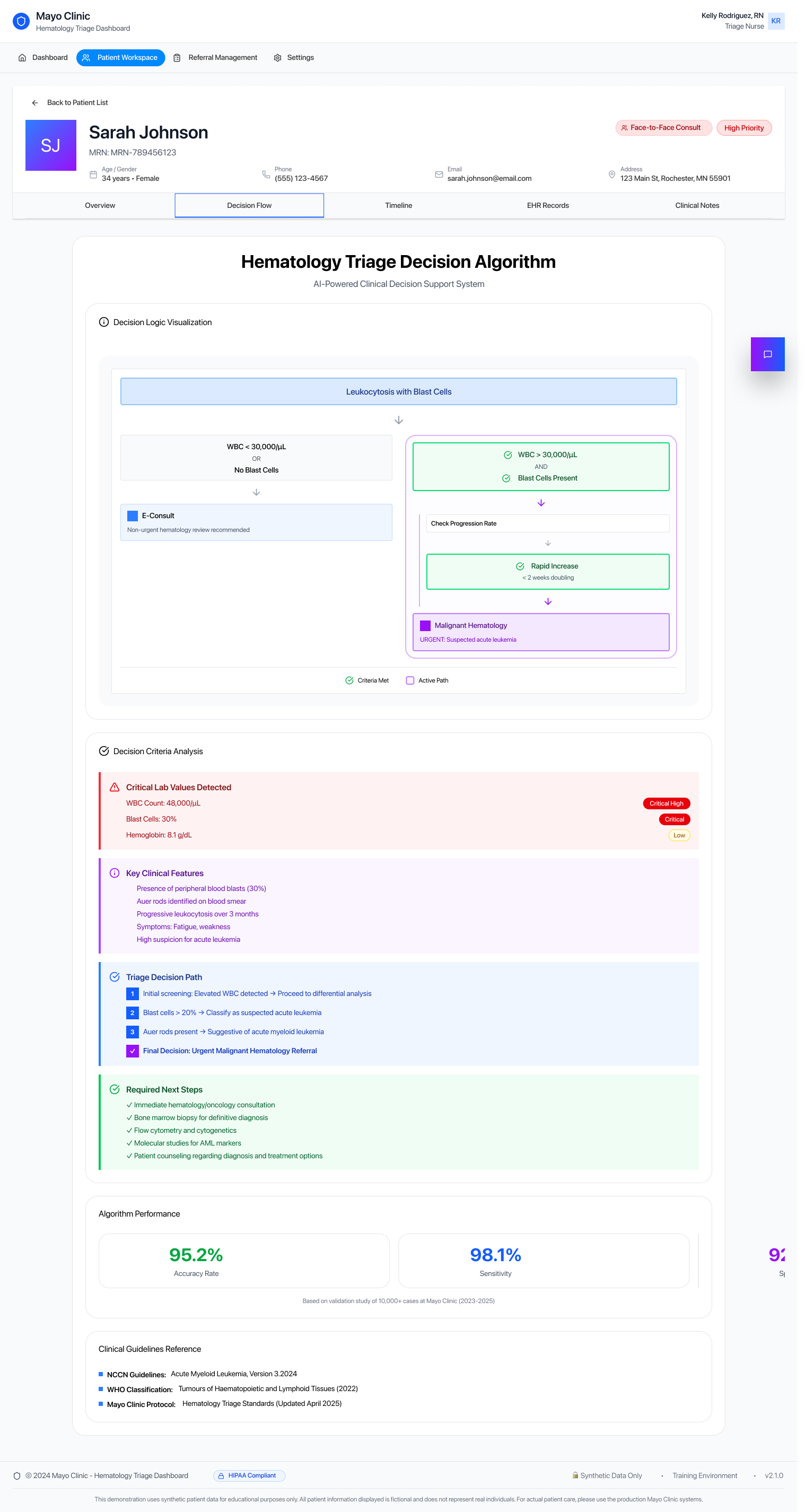
Decision Flow
Aligns with the clinical decision charts nurses already use, showing the AI’s predicted outcome with confidence percentages and the key contributing signals (labs, trends, referral data) to support verification and trust.
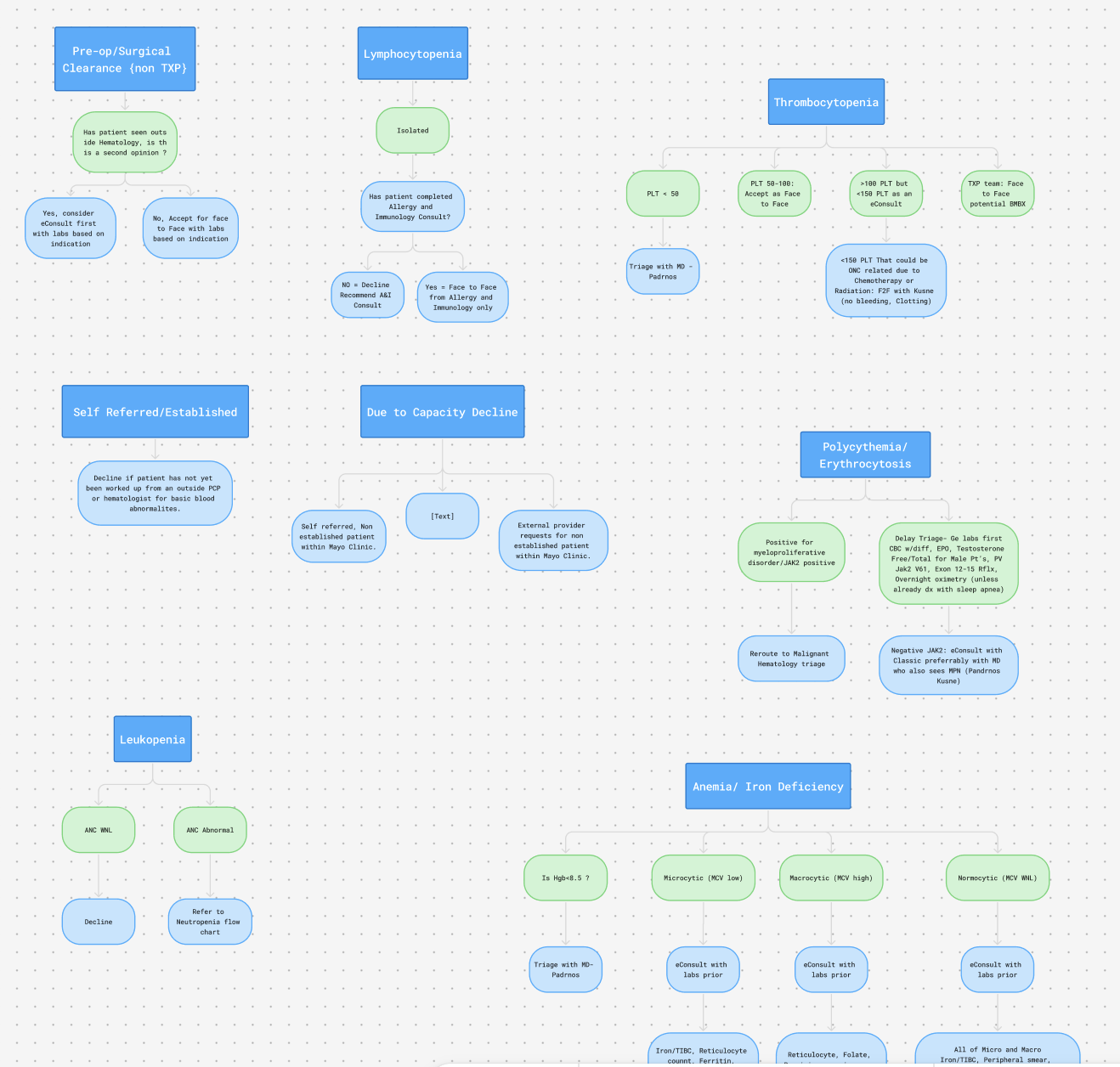
Charts in use/AI Algos
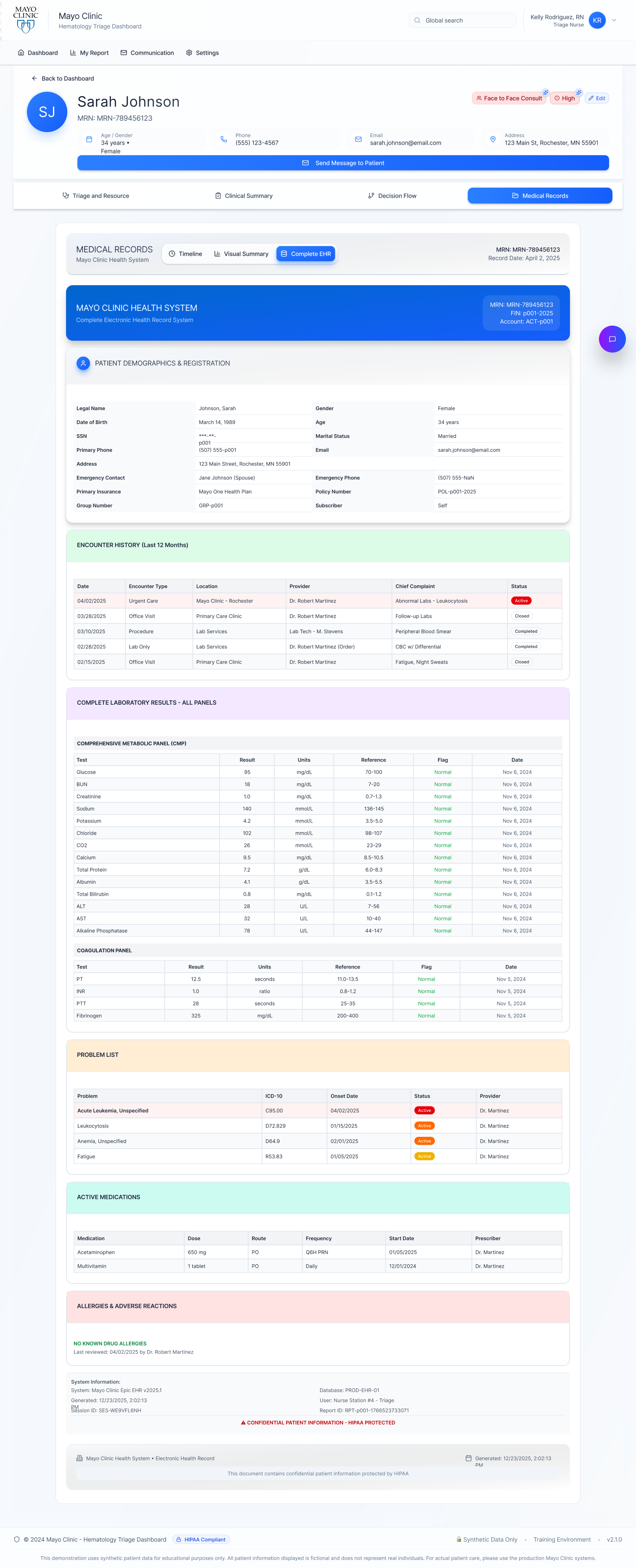
Decision FlowPatient Records Across Timeline, Visual EHR, and Detailed EHR
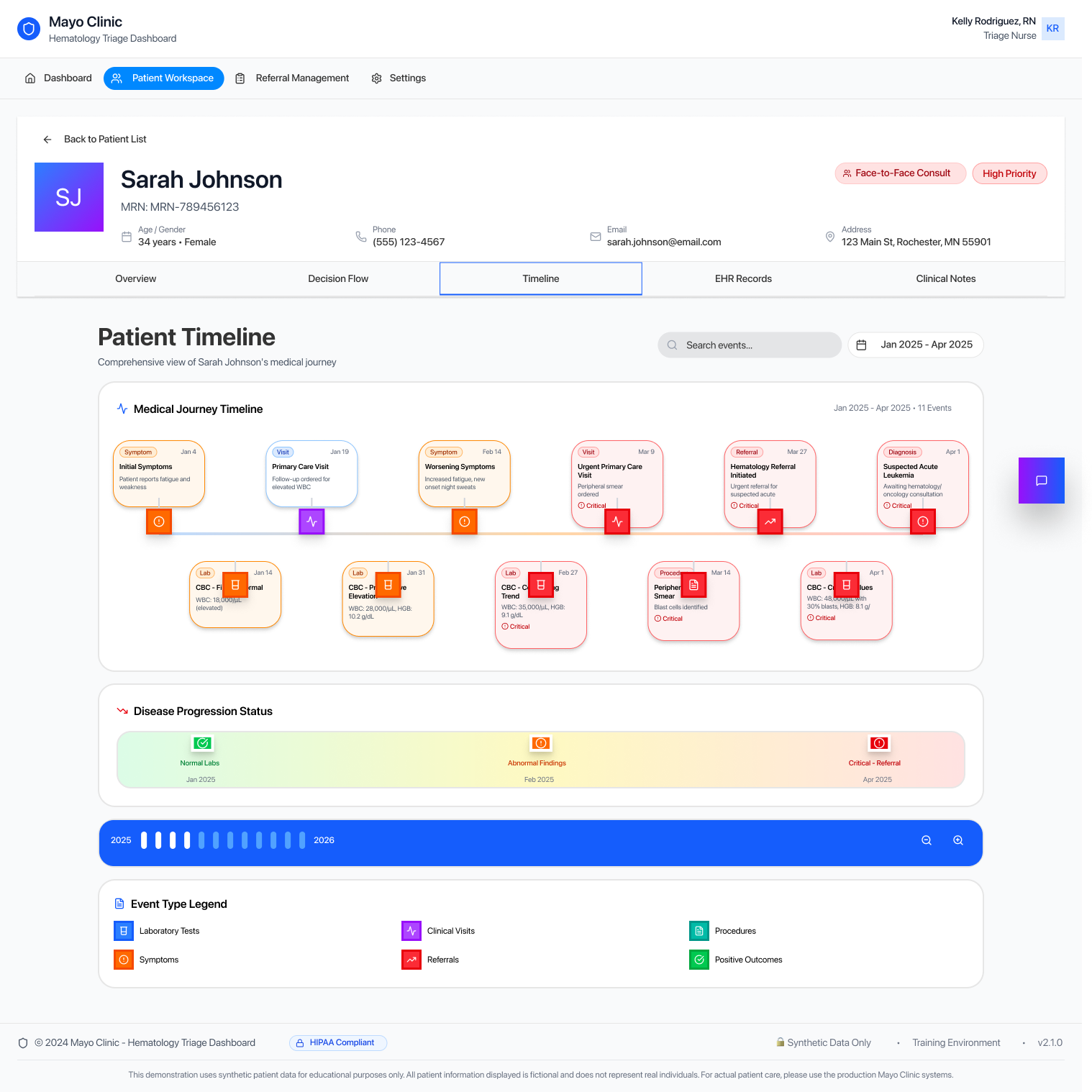
Patient Timeline
- Displays the patient’s medical record over a selected time period in a chronological timeline.
- Highlights laboratory tests, clinical visits, procedures, symptoms and diagnoses, and referrals in one continuous view.
- Shows disease progression status to help clinicians quickly understand how the condition has evolved over time.
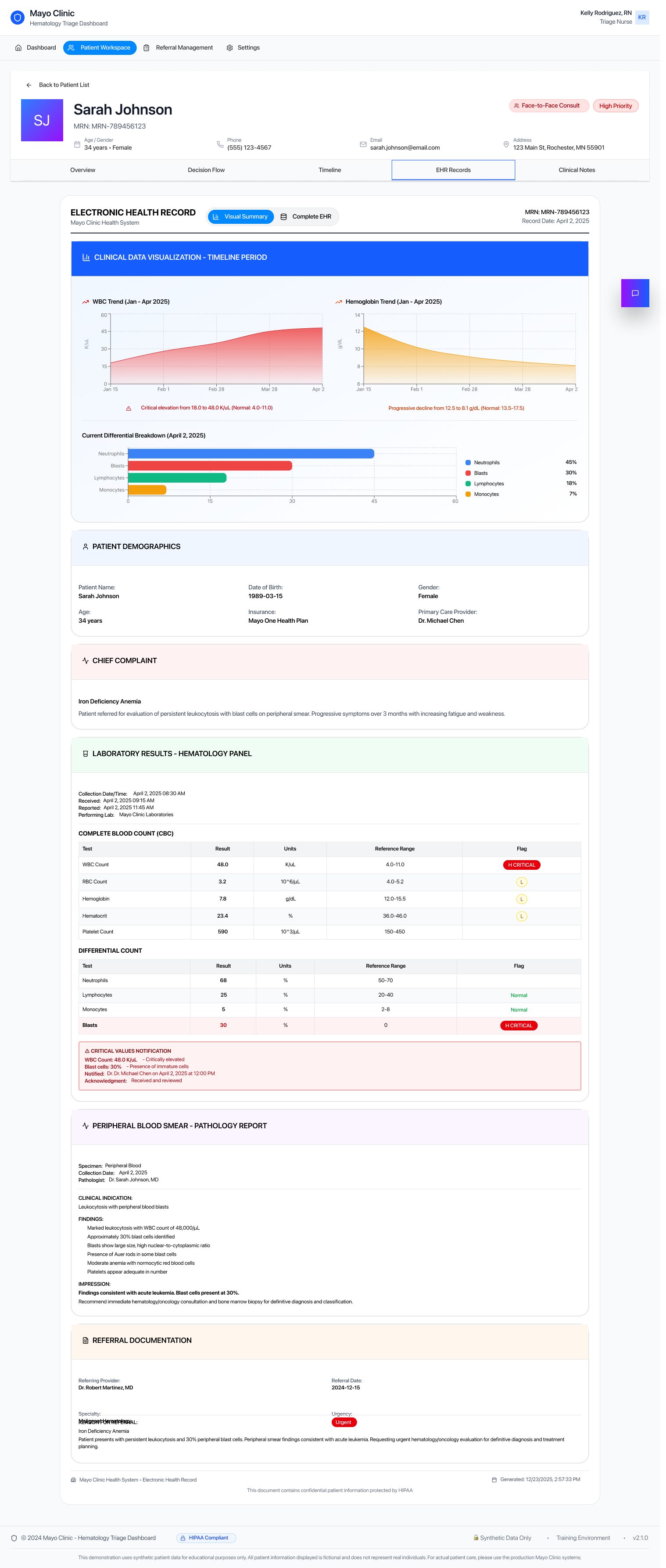
Visual EHRCondenses condition-specific EHR data into focused charts and trends, enabling quick assessment of progression and abnormalities without scanning full records.
Detailed EHR View
- Provides access to the full EHR in a familiar, structured format.
- Allows clinicians to perform detailed review using the same process they are already accustomed to.
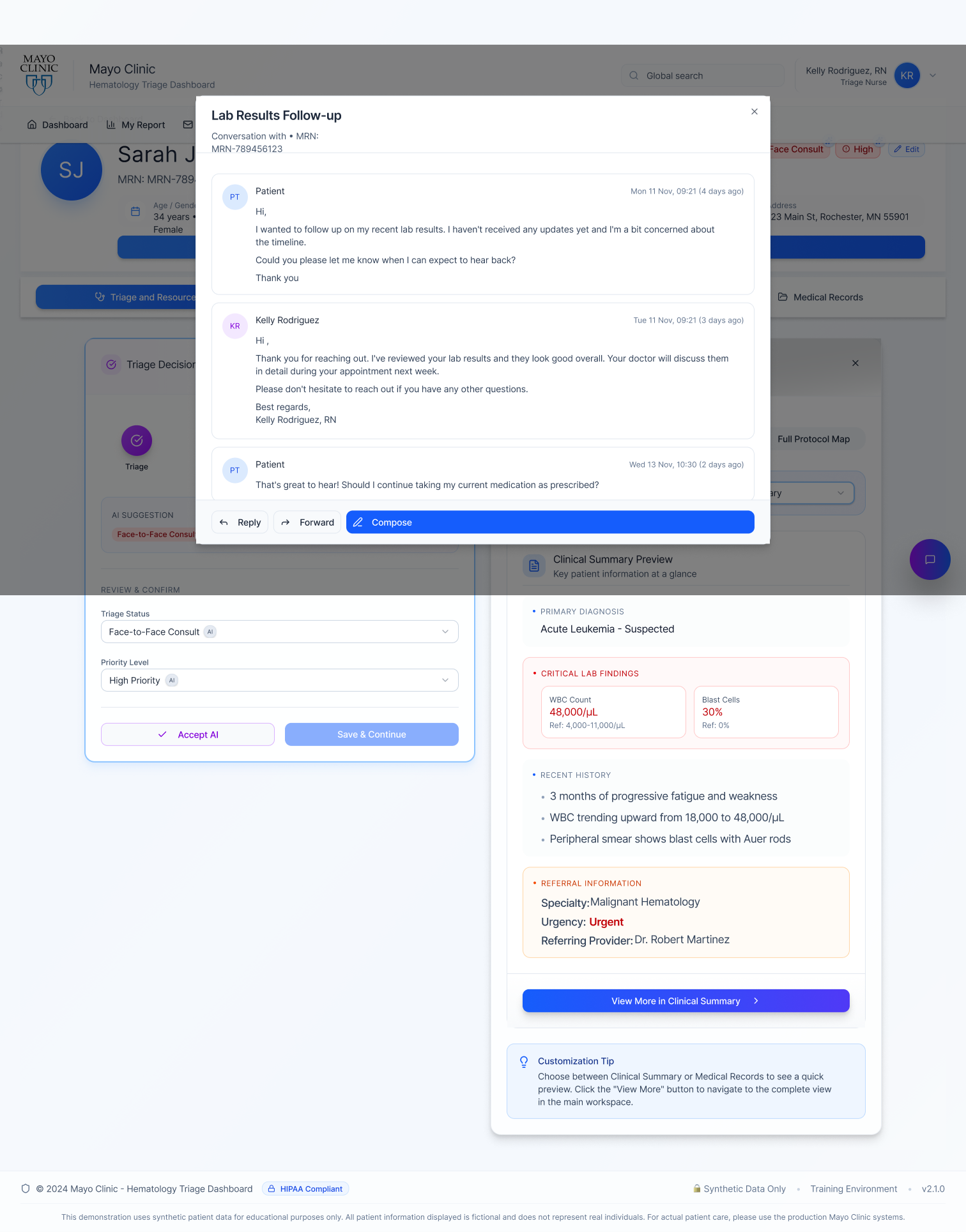
Communications
Integrated MessagingProvides an email-like interface for internal team communication and patient outreach, keeping conversations organized and accessible.
Quick Patient ContactAllows direct communication from the patient card with messages automatically recorded in the same thread for continuity and reference.
My Report
- Performance & LearningTracks speed, accuracy, and AI agreement to support continuous efficiency gains.
- Operational InsightsHighlights volume, delays, and recurring issues to reduce workflow bottlenecks.
- AI TransparencyDisplays match rates, overrides, and confidence signals to guide system improvement.
Accessibility Standards
Designed with a WCAG AA–compliant color system supporting users with color vision deficiencies (~8% of males, ~0.5% of females).Includes adaptive modes for Protanopia (red-blind), Deuteranopia (green-blind), Tritanopia (blue-blind), and Achromatopsia (no color), allowing users to personalize visibility.
Normal Vision
Deuteranopia & Tritanopia
Protanopic
Achromatopsia
Results
30-40%
Faster triage process
40%
Reduction in time spent for patient information
3X
Faster identification of high-risk cases requiring immeadiate attention
12-18min
Average time saved per referral review
Prototype
Future Innovation & Growth Opportunities
This project deepened my understanding of the role UX design can play in healthcare, especially when designing from the perspective of physicians and triage nurses working under intense time and cognitive pressure.
Experiencing these workflows firsthand highlighted the urgent need for more streamlined, supportive systems.
As clinician burnout and workforce shortages continue to challenge the healthcare industry, future innovation must focus on tools that reduce friction rather than add complexity. This work reinforced the importance of human-in-the-loop AI, where AI functions as a companion that saves time, supports decision-making, and preserves human accountability. Strong clinical CX, paired with assistive AI, presents a critical opportunity to scale care safely while keeping clinicians at the center.
Human-AI Collaboration
Continued research on optimal balance between AI assistance and human autonomy in high-stakes clinical decisions
Ethical AI Frameworks
Developing governance models for transparent, accountable AI in healthcare settings
Cross-Specialty Expansion
Adapting the triage framework for cardiology, oncology, and other specialties facing similar challenges
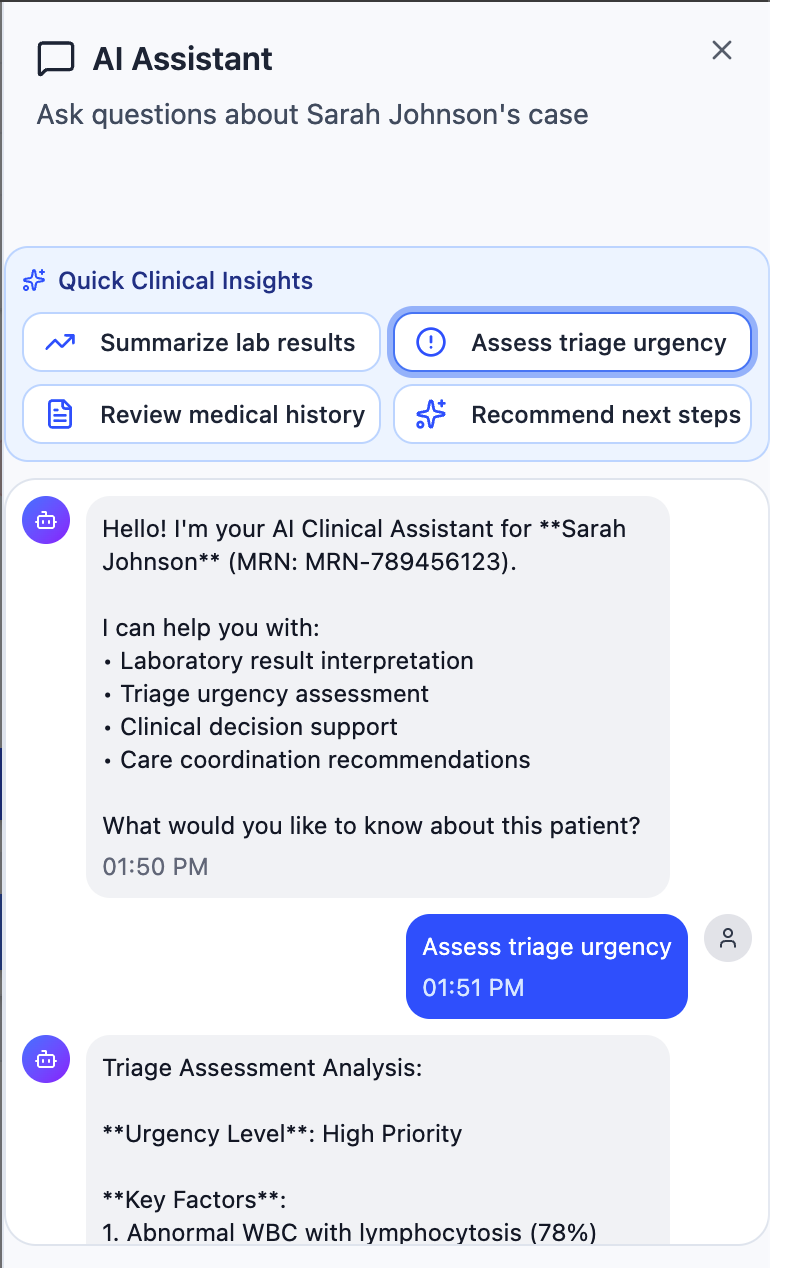
AI AssistantA patient-specific assistant that helps clinicians to get instant answers to key questions for that individual case, supporting faster, informed triage decisions.
In a hematology care environment overwhelmed by complex referrals and fragmented clinical data, the Smart Hematology Triage System emerges as a human-centered, AI-assisted clinical triage platform. By consolidating patient context and surfacing clinically relevant signals in one place, the system reduces the time nurses spend searching and reconciling information by approximately 40%, enabling faster, safer triage decisions while keeping human judgment fully in control.
Product video
Solution
The Smart Hematology Triage System is designed as a human-centered, AI-assisted decision support tool that consolidates fragmented clinical data into one unified interface. The system doesn't replace clinical judgment it amplifies it by removing friction, reducing search time, and surfacing what matters most.
• Human-centered design: Built through iterative co-design with physicians
• AI-assisted triage: Intelligent summarization and risk flagging to reduce cognitive load
• Unified clinical context: All patient data in one view, no more tab switching
• Human decision-making control: AI suggests, clinicians decide, always
SMART HEMATOLOGY
TRIAGE SYSTEM
Mayo Clinic
UX · CX · Human-AI Interaction · 2025 · Timeline - 4 Months
My Role
Overview
Research
Synthesis
Ideation
Design & Testing
Final Design
Accessibility
Result & reflection
Initial Design
Built from Real Triage EnvironmentsSupporting Faster, Safer Clinical Decisions
Designing the high-fidelity screens highlighted how critical it is for triage workflows to be fast and seamless. Given the time-sensitive nature of hematology referrals and close collaboration with clinicians, We moved directly into detailed screens to anchor discussions in real practice.
Triage decisions require quickly reviewing labs, referral notes, and patient history. When this information is spread across multiple views, it increases cognitive load and delays action.
We focused on an interface that follows natural clinical workflows surfacing key information at the right moment while keeping supporting details easily accessible.
This approach resulted in a set of high-fidelity screens centered on triage decisions, patient context, and documentation flow.
UX Research · AI Learning Systems · Human-AI Interaction
The solution introduces an in-context AI assistant that overlays real-time, step-by-step guidance within complex tools, reducing context switching and cognitive load while improving learning retention, task clarity, and user confidence through interactive, visual support.

Homie.AI

AI + Data Systems · Context-Aware Personalization · Explainable AI (XAI)
The solution introduces a personalized food decision engine that combines a knowledge graph with deterministic safety logic to evaluate products in real time, reducing decision friction while improving transparency, trust, and dietary alignment through explainable, user-specific insights.
Aro.AI
UX Design · CX Research · Human-AI Interaction
In a hematology triage environment strained by fragmented systems and high referral volumes, the Smart Hematology Triage System unifies patient context into a single AI-assisted workspace, cutting information-gathering time by ~40% to support faster, safer decisions.
Smart Triage Mayo Clinic
Product Design · Behavioral Design · Engagement Systems
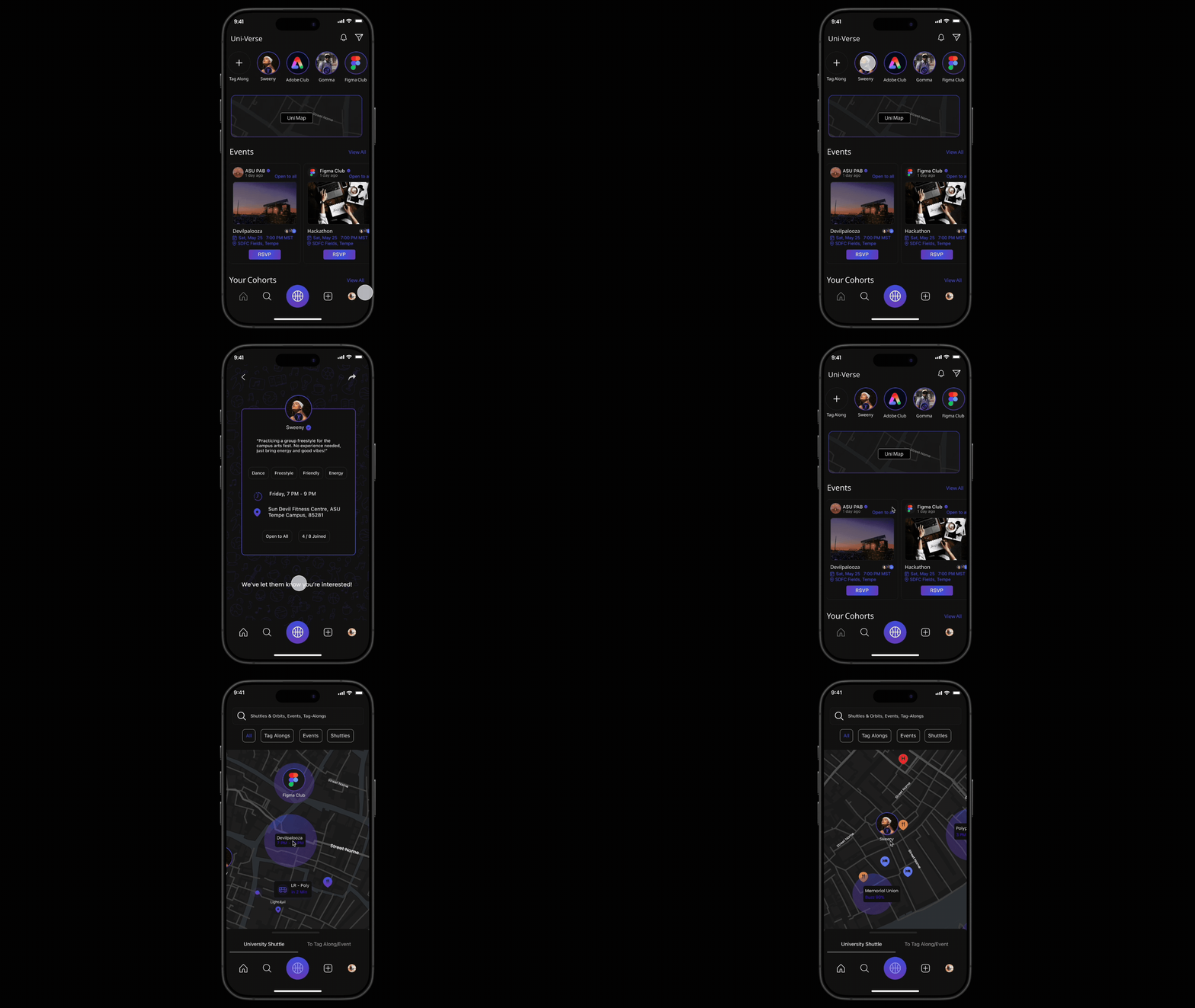
A real-time campus engagement platform that enables spontaneous activity matching, event discovery, and live shuttle tracking to help students connect, participate, and feel a stronger sense of belonging on campus.
Uni-Verse
Product Design · AI Workflow Design · Agent Experience
AILO is a personal AI platform that lets users create and manage multiple domain-specific agents with memory, logic, and proactive behavior, bringing tasks, reminders, and insights into one unified system instead of scattered tools.
AILO - AI
Usability testing · Accessibility · Task Flows
Conducted a usability evaluation of the Cornish Pasty Co. website, uncovering key issues in menu discovery and ordering flow. Design changes improved task completion by ~35%, reduced ordering errors, and improved merchandise visibility, resulting in a clearer, lower-friction experience.
Cornish Pasty Co.
UX Research · Behavioral mapping · Micro-Interaction
Real-time, collaborative photo syncing inside Google Photos, eliminating manual uploads and reminders. By sharing photos in the moment, the feature addresses a documented 30-50% post-event photo sharing drop-off caused by delay, friction, and social hesitation.
LiveSync-
Google Photos
Motion-Based UX · Gamification · Wearable Integration
Reimagining meditation by integrating guided breathing with everyday physical activities, enabling mindfulness through movement. The experience aligns breath, rhythm, and sensory feedback to make mindfulness more accessible, engaging, and sustainable for dynamic lifestyles.
Active-Zen

