📡 Album Behavior
- Album appears like any other shared album
- As users capture photos, they are synced in real-time
- Users can pause/resume syncing using persistent notification overlay (shown above)
- Everyone in the album can react, view, and co-own the memory bubble


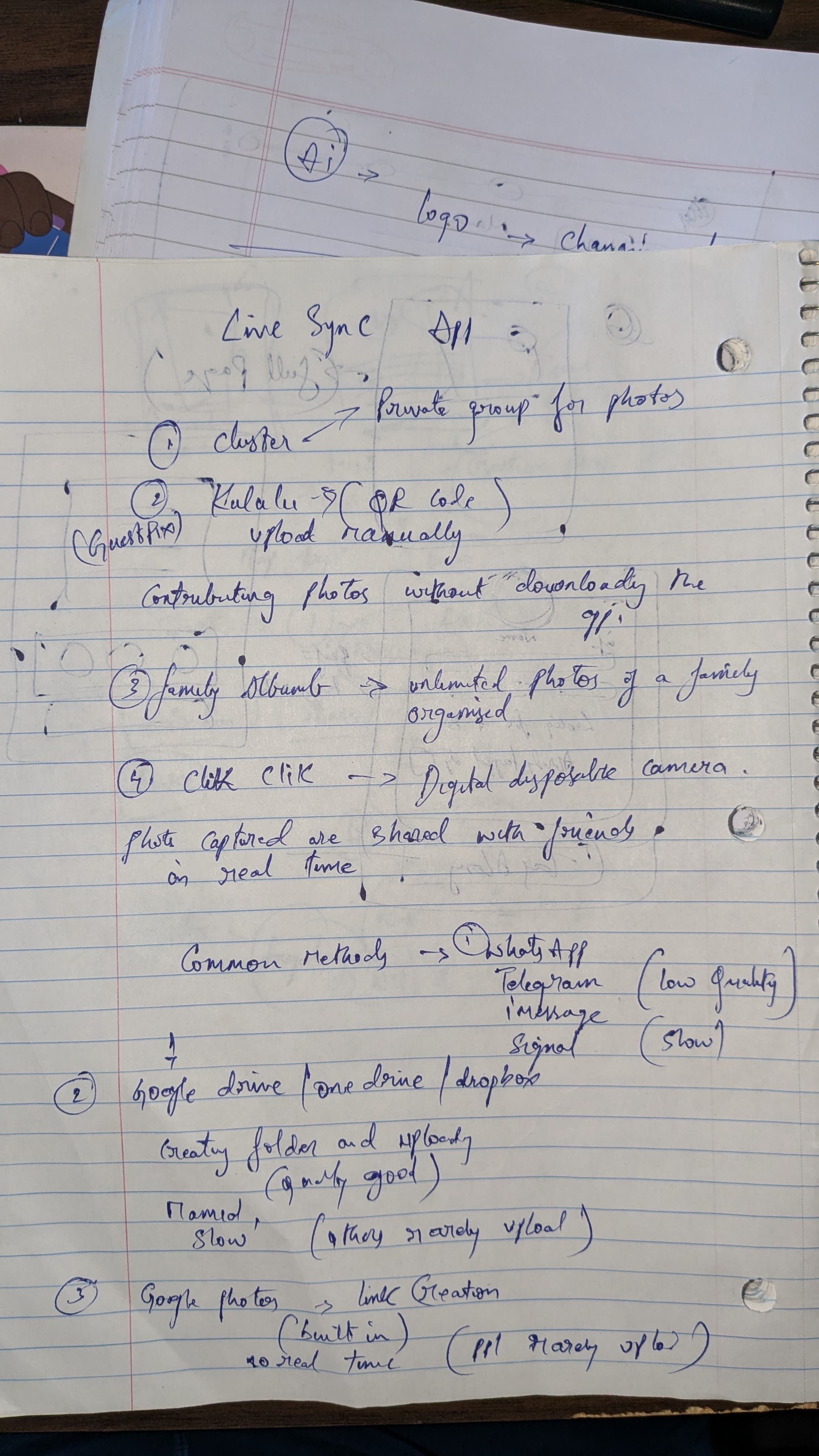
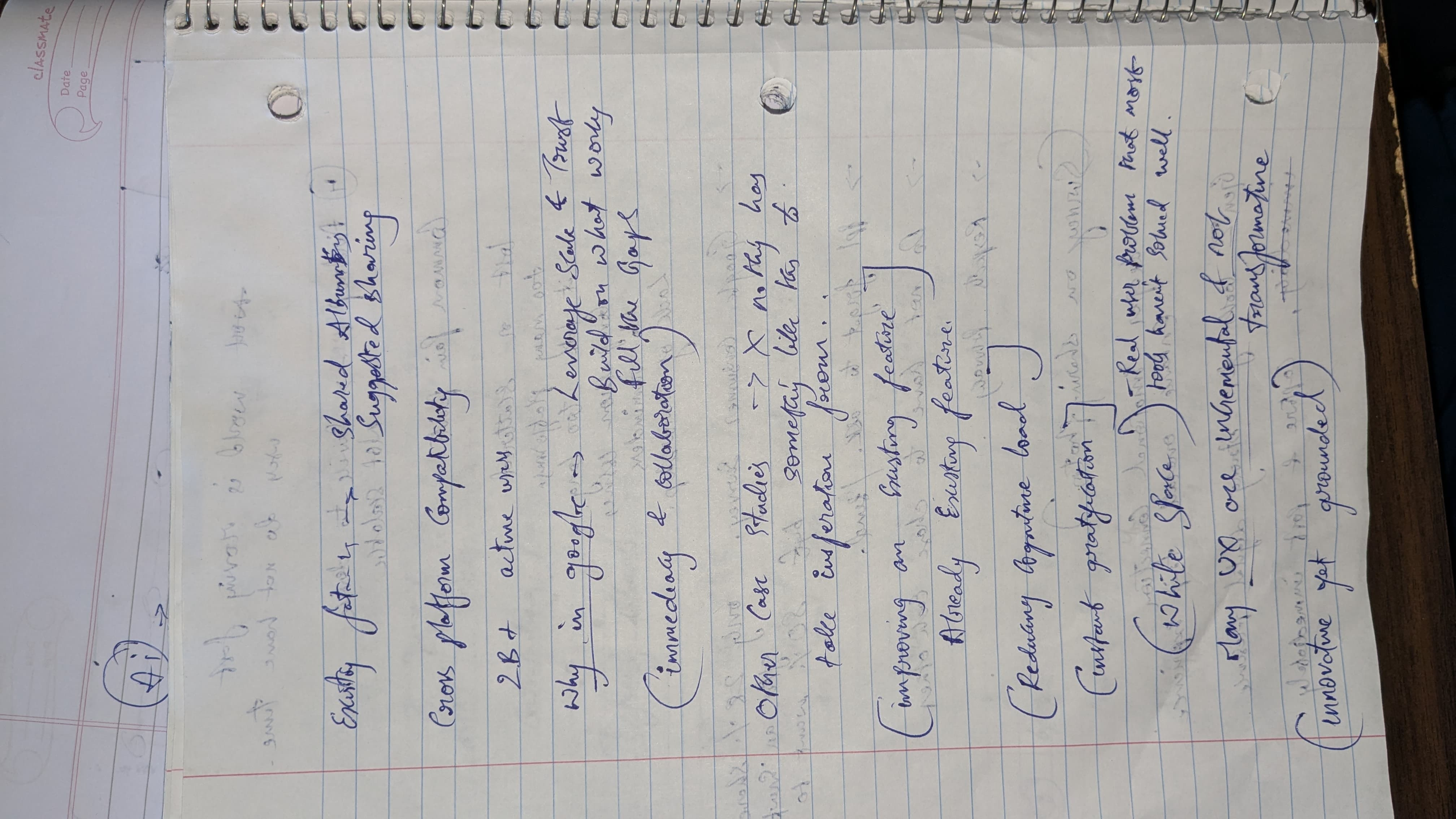
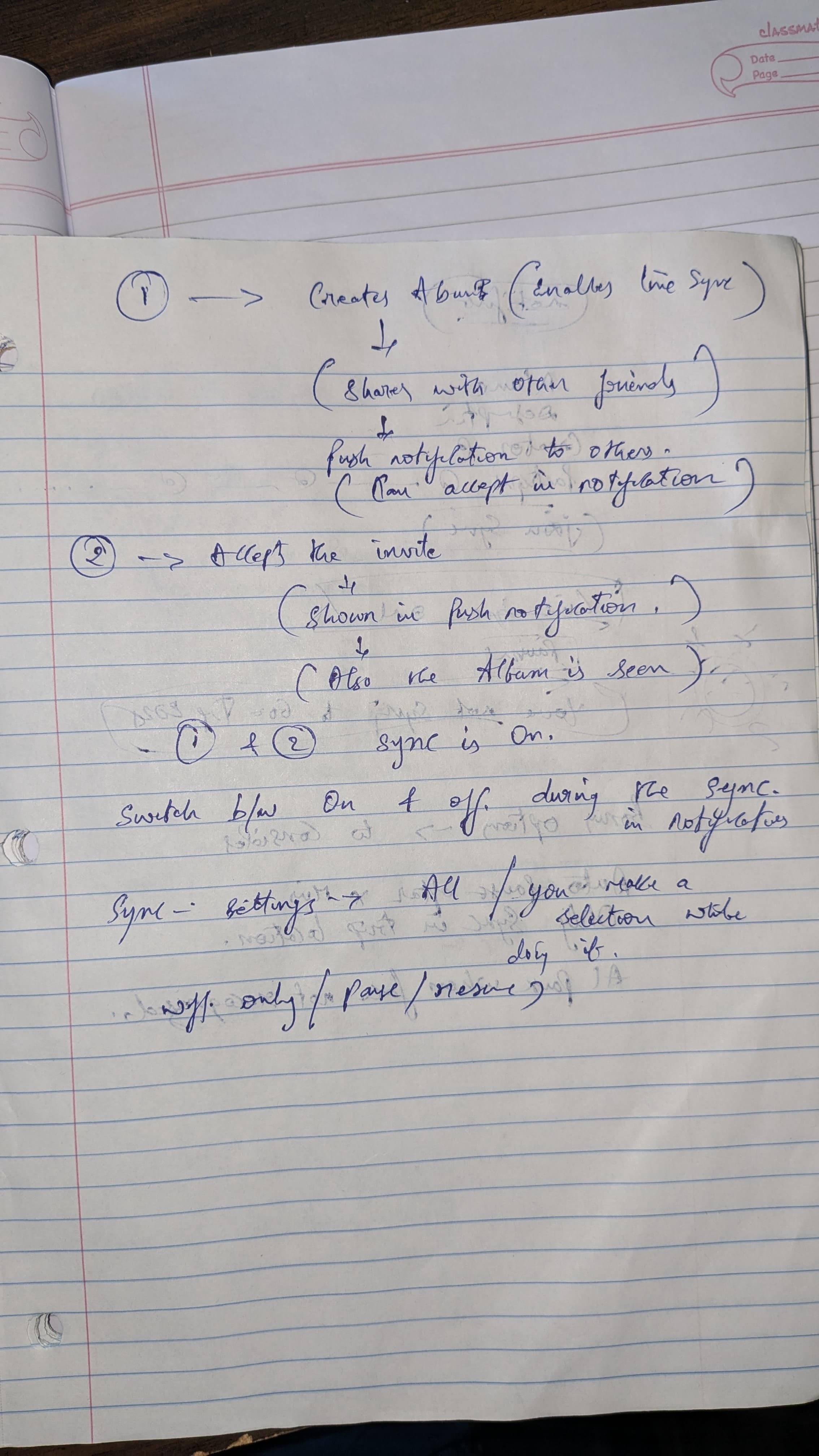
✍️ From Notes to Interface: Raw Thinking to Real Design
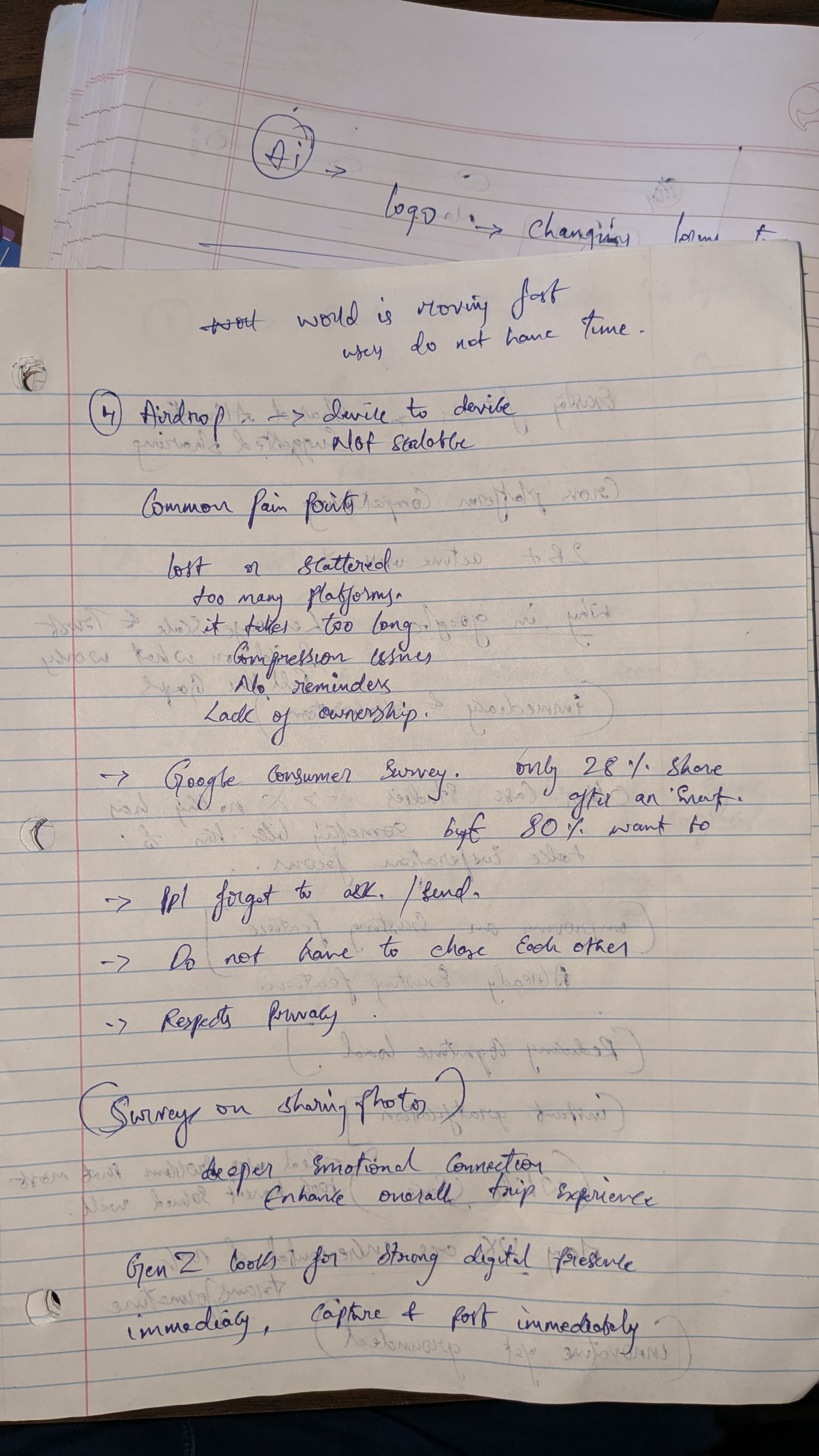
⚡ What LiveSync Unlocks
- ✅ No forgetting
- ✅ No manual upload burden
- ✅ No awkward reminders
- ✅ Instant group memory — shared, not chased
UX isn’t just about transforming the interface. It’s about evolving the experience — step by step, sync by sync.
🔄 And I saw how even within established systems like Google Photos, there's room to design smarter, leaner, more human-first experiences.
🧠 Final Reflection: Evolution, Not Reinvention
What started with one messy Google Drive link turned into a behavioral redesign of memory itself.
This wasn’t about UI polish. It was about:
- Amplifying what people already do
- Fixing something everyone accepts as “just how it is”
- Designing within the system, not outside it
UX doesn’t always have to be shiny. Sometimes, it just has to feel like magic — and LiveSync Album does.
Let memories sync themselves. We’ve got sunsets to chase.
🚀 Future Enhancements & Conceptual Add-ons
- ⏱️ Auto Pause After Duration: Automatically pause LiveSync after a set time (e.g., 30 mins) to avoid oversharing.
- 📍 Location-Based Sync Activation: Limit syncing to specific geofenced areas like trip destinations or event venues.
- 👥 Face Match-Based Sync: Only sync photos when familiar album member faces are detected — ensures group context and avoids accidental uploads.
- 📶 Wi-Fi-Only Smart Sync: Delays uploads until connected to stable Wi-Fi — great for remote trips or roaming situations.
- 🔄 Back-Sync on Request: Allow late joiners to request previously taken photos — album creator approves manually.
The process
Personal Trigger → Real-World Observation
Comparative App Audit
Feature Structuring via Micro-Restructuring Lens
Survey Mining + Behavioral Research
Technical Feasibility + Privacy Modeling
Gap Identification: Strategic White Space
📉 Synthesized Pain Points from Across the Research
🚫 Scattered Memories: Photos are lost across multiple platforms, with no central, unified memory bubble
📆 Delayed Sharing: Often happens days (or weeks) after the event — losing the emotional freshness
🔄 Platform Fragmentation: People juggle WhatsApp, Drive, iCloud, Telegram, AirDrop — but none offer seamless collaboration
🔗 Link Fatigue: Shared albums feel one-sided; users forget or ignore uploads
🔕 No Triggers or Prompts: No built-in reminders or nudges to encourage full participation
😬 Emotional Hesitation: People hesitate to ask others for photos post-event
📸 Loss of Control or Ownership: Albums feel like they “belong” to the creator, not the group
Together, these studies revealed a modern UX gap — not in image quality or app performance, but in real-time, low-friction, shared emotional experiences.
The real insight? Photo sharing is not just a utility task. It’s a social ritual. And rituals work best when they’re seamless, collaborative, and immediate.
🕳️ Enter the White Space
I wasn’t interested in building Yet Another Photo App™. I wanted to identify the missing puzzle piece.
And this was it:
Real-time, cross-user, collaborative syncing inside an app people already use and trust.
No new login. No QR code. No waiting.
Just a camera. A click. And the image shows up on everyone’s album — instantly.
📝 Short Overview
A chaotic road trip exposed a common problem: delayed, fragmented photo sharing. Instead of building a new app, I identified a white space in Google Photos and added a micro-restructured feature that’s intuitive, private, and instantly collaborative. This isn’t UX reinvention — it’s thoughtful evolution, built on what people already do.
🔎 From Personal Chaos to Collective Pattern Recognition
I started with my own experience — and then investigated if others were quietly suffering too.
Turns out, yes. A lot.
I explored:
Cluster: Real-time group album, but only works when open. Meh.
Kululu: QR-code based sharing at events. No app needed. Pretty clever.
FamilyAlbum: Designed for parents, grandparents — not ideal for squad trips.
ClickClick, Guestpix, Memento, Lapse: Each of these apps serves its own unique purpose — from event-specific QR sharing to private family albums.
They’re well-crafted for their niche use cases, but none are built for broad, real-time group sharing that’s frictionless and collaborative by default.
Most are app-dependent, slow, or designed for hyper-specific use cases. Also: nobody wants another photo app.
📚 So I Turned Into a Research Monster
To understand if this post-trip photo-sharing mess was just our group’s problem or a widespread behavior, I dove into a range of academic papers, user surveys, and behavioral insights. The goal wasn’t just to validate pain points, but to understand the psychology of photo sharing and why existing platforms often fail to support real-time group collaboration.

🔬 Studies & Surveys That Shaped the Solution
Think with Google & UX Collective:
Identified the "photo fatigue" phenomenon — where users intend to share but drop off due to post-event exhaustion or friction.
Balestrini et al. (2014):
People often forget or feel awkward asking for photos from others post-event — this creates emotional tension and missed memories.
McKinsey & Co. + Gen Z Reports:
This generation expects instant gratification, visual validation, and seamless UX — they’re less tolerant of effort-heavy sharing processes.
The Travel Psychologist Blog:
Sharing photos contributes to collective memory but also introduces stress when people feel pressured or delayed in receiving them.
Frontiers in Psychology:
Photo sharing enhances travel satisfaction and strengthens social bonding — especially when done during or shortly after the experience.
SAGE Journals – The Distorted Gaze:
81% of users edit their photos before posting, reflecting emotional investment, self-curation, and the desire for control.
Zenger News Survey:
Users take an average of 6+ photos a day, yet struggle to consolidate or share them — especially when multiple people contribute to the same experience.
Brocade Radar, Amberstudent, GuestCam blog posts:
Emphasized platform fragmentation, inconsistent ownership of albums, and lack of reminder systems as causes of frustration.
🛠️ Feature Breakdown
1. Create Shared LiveSync Album
- Accessible via the “+” button
- Invite others → Accept → Done
- Photos sync as you click, in real time
2. Persistent Notification Toggle
- Status bar says: “LiveSync On” → Tap to pause
- No digging into the app to stop sharing
3. Social + Emotional Layer
- “Karan just added 3 photos”
- ❤️ 😍 🔥 reactions available immediately
- Feels like a private feed, not a static dump
4. Privacy-Friendly Sync Controls
- Wi-Fi only uploads
- Location-filtered sync zones
- Optional upload approval — private moments stay private
🧪 But… Can It Actually Work?
Yes. Here’s the technical backbone:
On Device (Frontend):
- iOS: PhotoKit + background refresh + MediaStore (Android)
- Monitors camera roll for new entries → filters → queues
Backend (Firebase-inspired stack):
- Firestore DB: Real-time photo syncing across users
- Firebase Cloud Storage: Holds uploaded images
- Firebase Auth: Account-based control
- Cloud Functions: Metadata processing, permission logic
- FCM: Push notifications and LiveSync status alerts

Note: This is a Firebase-inspired implementation model for prototyping purposes. While Google Photos operates on its own internal infrastructure, this stack demonstrates how LiveSync can be technically viable using industry-standard tools.
🧑🎨 Prototype Preview: Bringing LiveSync to Life
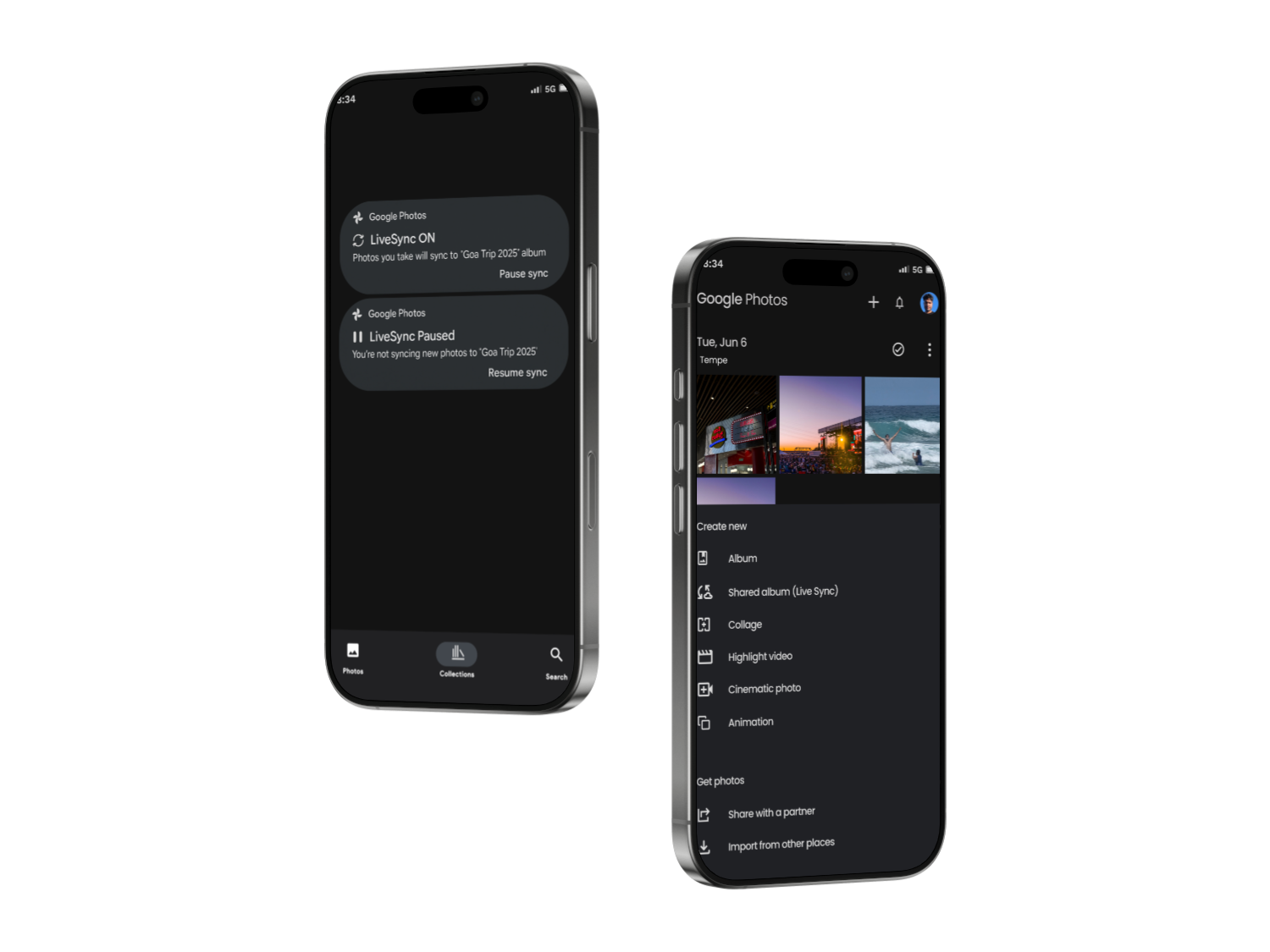
Here’s how I translated the idea into a working interface — designed directly inside the existing Google Photos experience to feel familiar, fast, and flexible.
🧷 Entry Point: '+' Button Flow
- Tap the ‘+’ icon at the top right
- Overlay opens with options like:
- Album
- Shared Album (Live Sync)
- Collage, Cinematic Photo, Highlight Video, etc.
🧩 LiveSync Album Creation Flow
- Add album title + optional description
- LiveSync toggle appears with a brief explanation:
- “Photos you take will be automatically added and shared in real time.”
- Invite users directly or share a link
- Tap Create → album is live
📡 Album Behavior
- Album appears like any other shared album
- As users capture photos, they are synced in real-time
- Users can pause/resume syncing using persistent notification overlay (shown above)
- Everyone in the album can react, view, and co-own the memory bubble
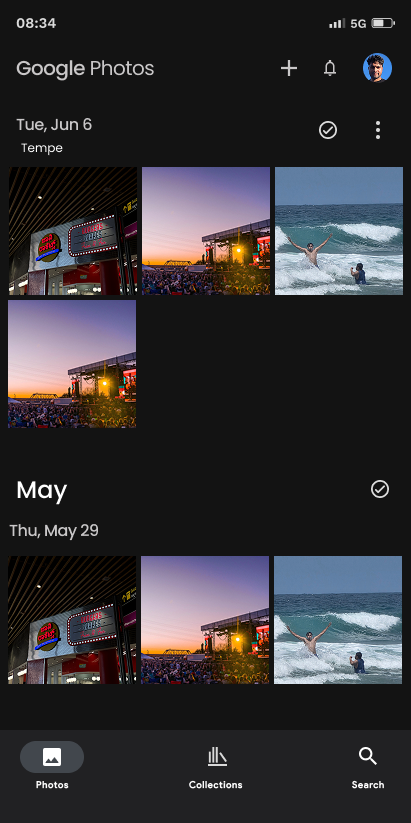
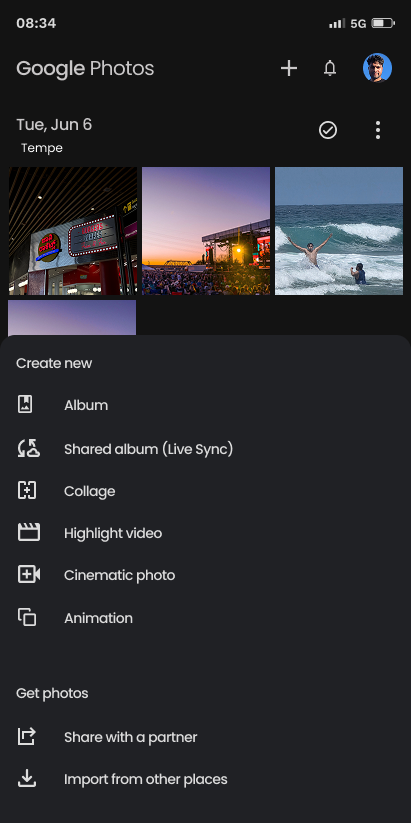
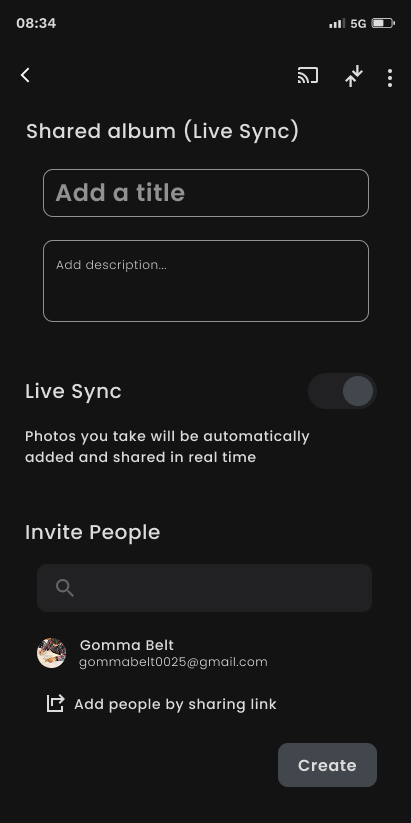
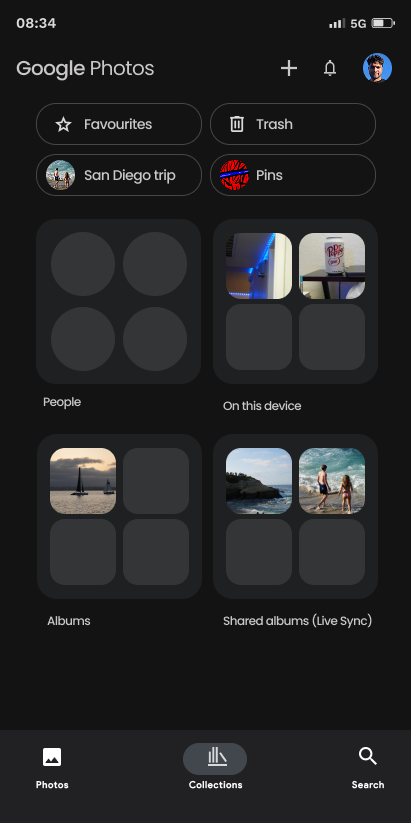


Selecting “Shared Album (Live Sync)” opens a familiar album creation interface with LiveSync enhancements
This prototype aligns with familiar Google Photos workflows, so there’s no learning curve — just a meaningful upgrade.
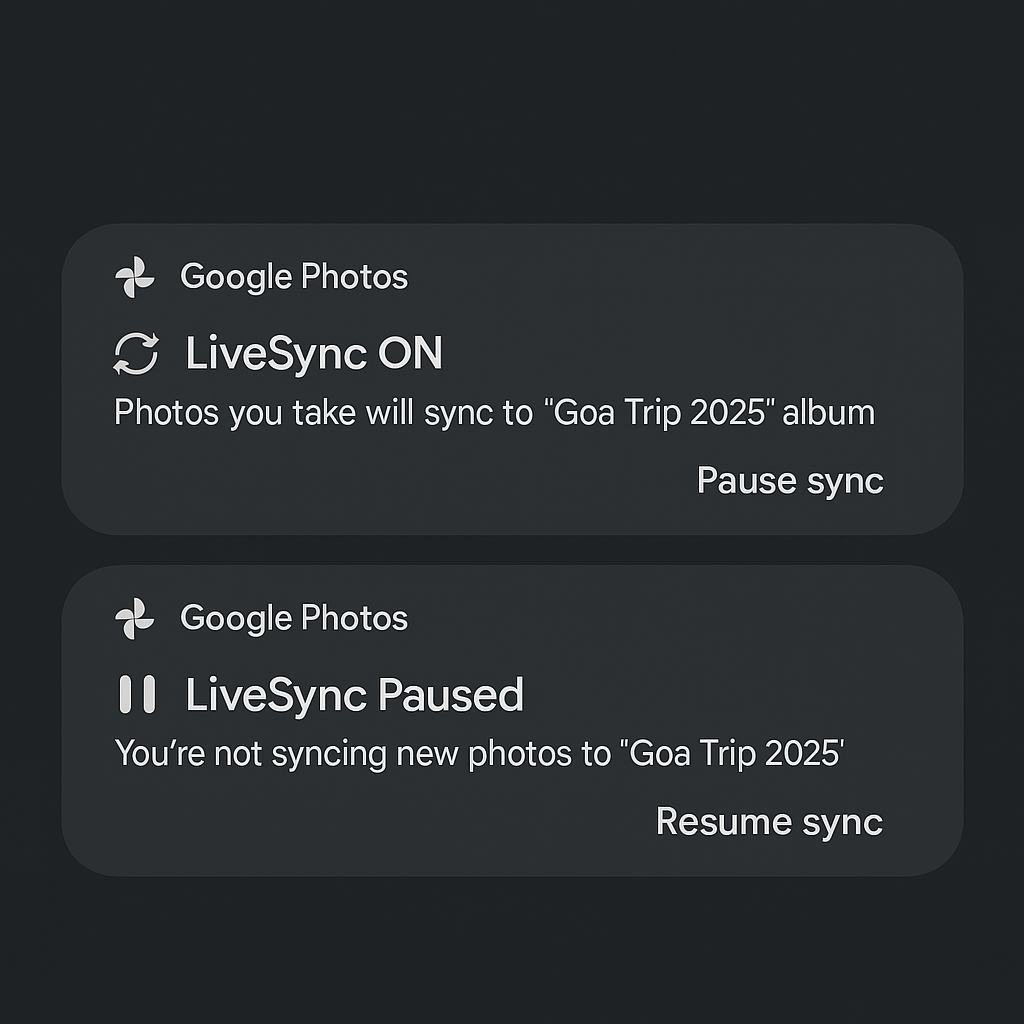
- LiveSync ON: Actively syncing — new photos you take are added to the shared album in real-time.
- LiveSync Paused: Syncing is paused — tap to resume anytime.
Prototype
🎓 What I Learned
This wasn’t just a UX exercise — it was a deep exploration into the full spectrum of product evolution. I discovered that great UX design doesn't always need to be loud or revolutionary — it can be both transformative and incremental.

- 🧩 I learned to identify white spaces — subtle yet high-impact gaps in products people use every day.
- 🧠 I experienced how micro-restructuring can lead to system-level upgrades that feel intuitive and delightful.
- ⚡ I explored how to create innovation that’s grounded, not flashy — rooted in behavior, context, and trust.
🚗 It All Started on a Road Trip
Four friends. One car. A journey from LA to San Diego. And about a thousand photos — most of which ended up on someone else’s phone.
At every beach, overlook, gas station snack stop, someone would yell, “Wait, take one of me!” We obliged. But after the trip? Absolute chaos.


We told ourselves we’d share everything later. The result? A jumbled mess of WhatsApp messages, Google Drive links that took 30 minutes to upload/download, AirDrop fumbles, and several “I forgot to send it” apologies.
And then I started wondering: Is there a simpler way to do this? Is there something that already exists — or could exist — that makes this process easier, without waiting, uploading, or relying on someone to remember to share?
🔧 Meet LiveSync Album: A Behavior Upgrade
Not a new app. Not a redesign. Just an evolution — inside Google Photos.
Because:
- It has 2B+ users
- It spans both Android and iOS
- It’s already a part of people’s daily photo flow

But what it lacked? Live, multi-user sync.
🎯 Why Google Photos Was the Perfect Host
Platform
iCloud Apple-only, still manual
WhatsApp Compresses images, unorganized chats
ClusterApp must be open, not scalable
Guestpix/Kululu Event-only, QR-dependent
Limitations
Google Photos?
- ✔️ Trusted platform
- ✔️ Cloud-native, fast
- ✔️ Already has shared album infra
- ✔️ Familiar flow for 2B+ users
This isn’t reinventing the wheel. It’s making the wheel self-driving.

Evolving Google Photos with LiveSync Album
A Micro-Restructuring UX Case Study Based on Real User Behavior
Kalyan Sudhakar
June 2025
UX Research
Behavioral Pattern Analysis
Micro-Restructuring Strategy
Real-Time Collaboration UX

🤯 The Behavior Shift in One Line
Magic...

From:
To:
“Hey, can you send me those pics later?”

“They’re already in the album.”

UX Research · AI Learning Systems · Human-AI Interaction
The solution introduces an in-context AI assistant that overlays real-time, step-by-step guidance within complex tools, reducing context switching and cognitive load while improving learning retention, task clarity, and user confidence through interactive, visual support.

Homie.AI
AI + Data Systems · Context-Aware Personalization · Explainable AI (XAI)
The solution introduces a personalized food decision engine that combines a knowledge graph with deterministic safety logic to evaluate products in real time, reducing decision friction while improving transparency, trust, and dietary alignment through explainable, user-specific insights.
Aro.AI
UX Design · CX Research · Human-AI Interaction
In a hematology triage environment strained by fragmented systems and high referral volumes, the Smart Hematology Triage System unifies patient context into a single AI-assisted workspace, cutting information-gathering time by ~40% to support faster, safer decisions.
Smart Triage Mayo Clinic
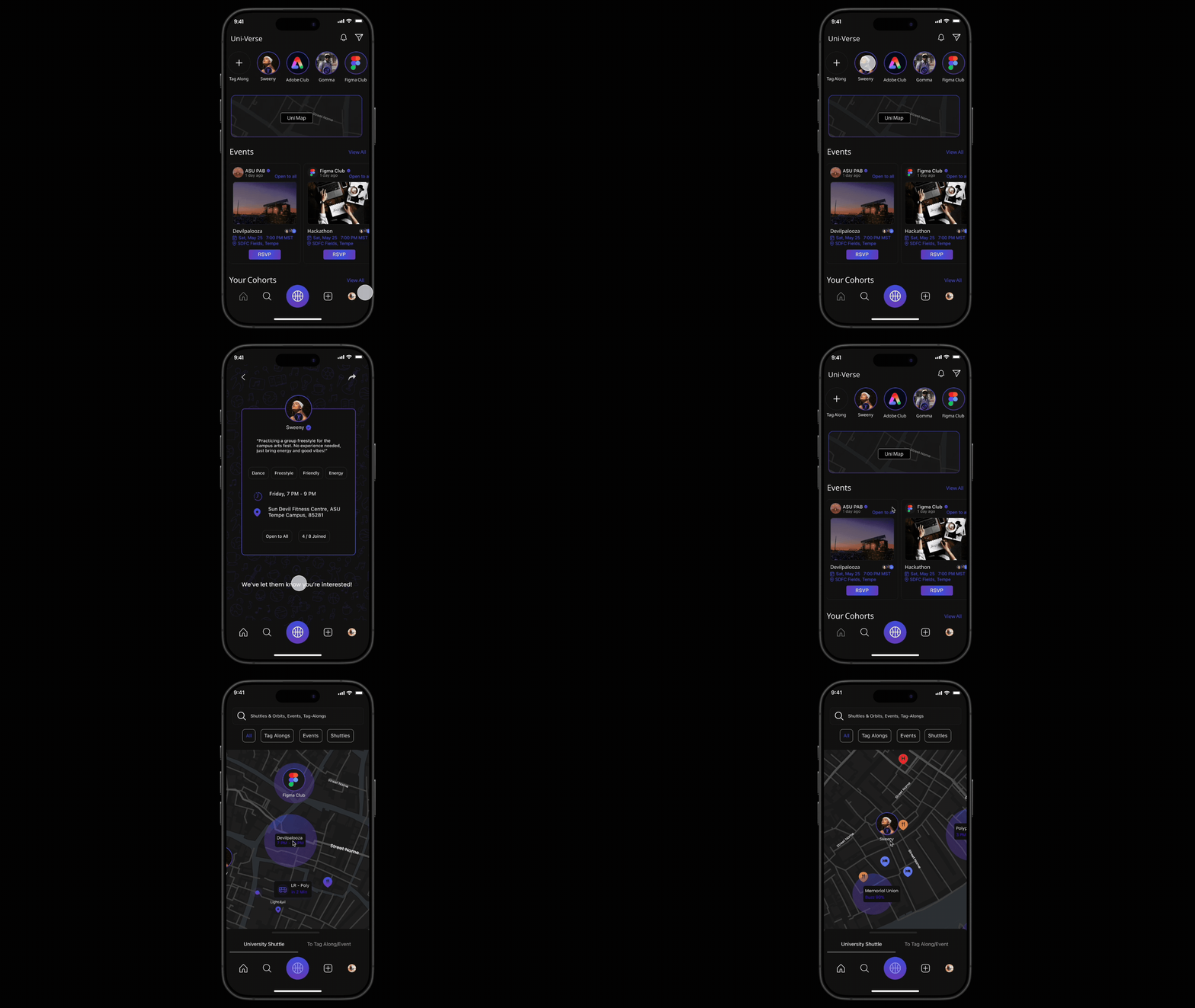
Product Design · Behavioral Design · Engagement Systems
A real-time campus engagement platform that enables spontaneous activity matching, event discovery, and live shuttle tracking to help students connect, participate, and feel a stronger sense of belonging on campus.
Uni-Verse
Product Design · AI Workflow Design · Agent Experience
AILO is a personal AI platform that lets users create and manage multiple domain-specific agents with memory, logic, and proactive behavior, bringing tasks, reminders, and insights into one unified system instead of scattered tools.
AILO - AI
Usability testing · Accessibility · Task Flows
Conducted a usability evaluation of the Cornish Pasty Co. website, uncovering key issues in menu discovery and ordering flow. Design changes improved task completion by ~35%, reduced ordering errors, and improved merchandise visibility, resulting in a clearer, lower-friction experience.
Cornish Pasty Co.
UX Research · Behavioral mapping · Micro-Interaction
Real-time, collaborative photo syncing inside Google Photos, eliminating manual uploads and reminders. By sharing photos in the moment, the feature addresses a documented 30-50% post-event photo sharing drop-off caused by delay, friction, and social hesitation.
LiveSync-
Google Photos
Motion-Based UX · Gamification · Wearable Integration
Reimagining meditation by integrating guided breathing with everyday physical activities, enabling mindfulness through movement. The experience aligns breath, rhythm, and sensory feedback to make mindfulness more accessible, engaging, and sustainable for dynamic lifestyles.
Active-Zen

